Leer este artículo en español →
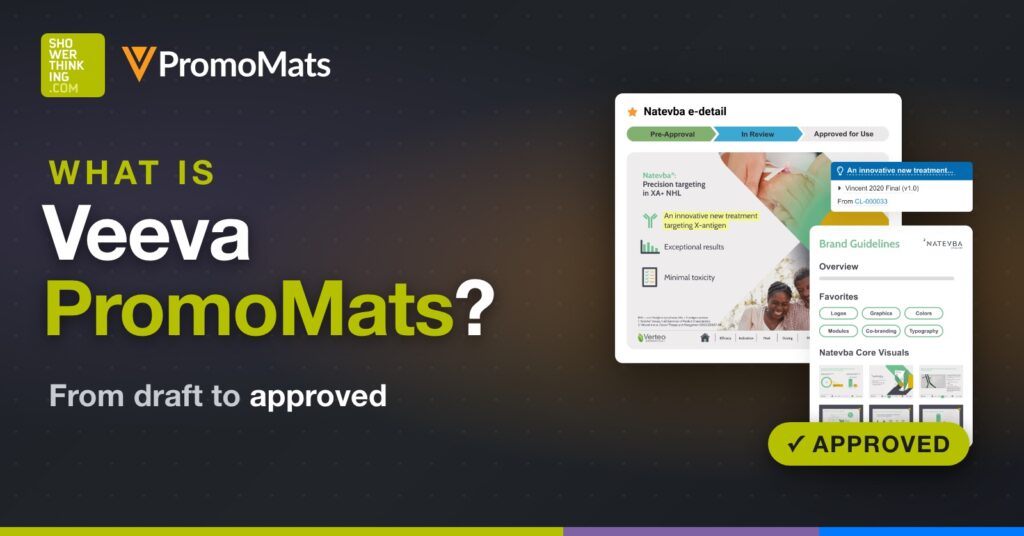
Veeva PromoMats is the regulated content management application pharma companies use to create, review, approve and distribute promotional content. You will also see it called Veeva Vault PromoMats: it is the same product, built on Veeva's Vault platform. This guide covers what it does, how a piece moves through MLR review, what the claims library and modular content change, how approved content reaches the field, and where AI is coming in.
Joaquín País, CEO of ShowerThinking, also explains it on video:
What is Veeva PromoMats?
Every brochure, email, slide deck or banner a pharma company shows to a healthcare professional has to be approved first by medical, legal and regulatory. PromoMats is where that work happens, along with everything around it: the piece is created, reviewed and approved, its images and text are stored, and it is sent to the channels where it is used. When it expires or has to be withdrawn, it is pulled from those channels from the same place.
Veeva describes it as a regulated content management application that supports the full lifecycle of promotional content: creation, review and approval, digital asset management, claims management and modular content.
Veeva PromoMats or Veeva Vault PromoMats: same product
Both names show up in job posts, LinkedIn profiles and older documentation. Veeva now calls it Veeva PromoMats, and it still runs on Vault, the platform Veeva builds its content and quality applications on. If someone mentions Vault PromoMats, they mean the same thing.
What is MLR review?
MLR stands for medical, legal and regulatory, the three teams that review every promotional piece before it can be used:
In most companies it is the slowest step between a marketing idea and the material that reaches the doctor, which is why PromoMats puts most of its features there.
How a piece moves through PromoMats
- Draft. The brand team or its agency uploads the piece, for example a visual aid for reps.
- Review workflow. The piece starts a workflow with defined stages, and each reviewer gets a task.
- Comments on the piece. Reviewers annotate the document directly, in threads, so each discussion stays attached to the sentence it is about.
- Verdict. When everyone agrees, the approver gives the verdict with an electronic signature, and the piece is approved for distribution.
- Submission, when needed. In the US, PromoMats can also prepare the package for submission to the FDA.
Claims and references
Much of the review time goes into claims. A claim is a statement about the product, such as a clinical trial result, and every claim needs a reference that backs it up.
In PromoMats, claims are linked to their references inside the piece itself. The reviewer clicks a claim, lands on the exact passage of the study that supports it, and goes back to the review. Veeva calls this auto-linking, and it replaces the manual work of matching every statement to its paper.
The claims library
Claims also live in a library of their own. Each one has its approved text, its references, and the products and countries it applies to. An approved claim can be reused, and the library shows every piece where it appears. So when a study is updated or a claim has to change, you know which materials are affected without hunting for them.
Modular content: less review for what is already approved
A content module groups approved claims, images and text that are allowed to travel together, with rules on how they can be combined. From one module, the team builds an email, a slide for the rep or a social post, for different audiences and channels.
Because the parts were approved before, the review can be lighter. PromoMats compares a new piece with the content it came from and can route it through a different workflow depending on what it reuses:
Digital assets and brand portals
All of this sits in one library, the one place where a brand's content lives. Images are tagged automatically when they are uploaded, they carry their usage rights and licenses, and you can see which pieces use each one. On top of the library, brand portals give each brand or campaign its own page, where local teams and agencies find approved materials, add them to a cart and download what they need.
From PromoMats to the rep: Veeva CRM, CLM and Approved Email
PromoMats is connected to Veeva CRM. An approved piece reaches the rep's presentation app (CLM) and the Approved Email templates without anyone moving files around. When a piece is withdrawn, it leaves those channels the same way, so a rep does not show a doctor something that is no longer approved.
Through its open API, PromoMats also connects to other systems, such as a website content manager or a campaign tool. If you work with Marketing Cloud, this article on rep suggestions shows how digital marketing and field work come together.
AI in MLR review
Veeva has added AI agents inside PromoMats:
- Quick Check Agent. Before a piece goes to review, it looks for spelling and grammar errors, missing safety information, missing unsubscribe links and risky wording, such as overstated efficacy or a superiority claim without support.
- Content Agent. During the review, it gives the reviewer a summary of the piece and can list every claim in it.
- Agentic MLR review. With Veeva Falcon MLR, an agent reads a new piece, flags each risk with the evidence behind it, suggests an approved claim from the library when a statement goes too far, and links correct statements to their references.
The reviewers still decide. The agents do the first pass. Vault also has an MCP server, so assistants such as Claude, Gemini or Copilot can work with PromoMats content.
What changes in a single piece
Before, reviewers found the typos, chased every reference by hand and sent the piece back for several rounds.
With PromoMats, the references are already linked, the claims come from the library, the agent catches basic errors before anyone opens the piece, and reviewers spend their time on what needs judgment.
If you are starting out, start with the claims library. Modular content, lighter reviews and the agents all depend on it.
Veeva PromoMats FAQ
Is Veeva PromoMats the same as Veeva Vault PromoMats?
Yes. It is the same application. Veeva now calls it Veeva PromoMats, and it runs on the Vault platform.
What is PromoMats used for?
To manage the full lifecycle of a pharma company's promotional content: creating it, reviewing and approving it through MLR, storing its assets and claims, distributing it to channels and withdrawing it when it expires.
What does MLR stand for?
Medical, legal and regulatory: the three teams that review every promotional piece before it can be used with healthcare professionals.
What is a claim in PromoMats?
A statement about the product, such as a clinical trial result, stored with its approved text, its references, and the products and countries it applies to.
How does PromoMats connect to Veeva CRM?
Approved content reaches CLM, the rep's presentation app, and the Approved Email templates. Content withdrawn in PromoMats leaves those channels too.
Does PromoMats have AI?
Yes. A Quick Check Agent reviews a piece before MLR and a Content Agent helps the reviewer. With Veeva Falcon MLR, Veeva adds agentic MLR review, with agents that flag risks with their evidence and suggest approved claims.
Sources
For how the other big platform in the industry approaches it, see What is Salesforce Life Sciences Cloud?
How ShowerThinking can help
We have been working with Veeva PromoMats for years, next to the content and commercial teams of pharma companies. If you want to see what would change in your MLR review process, from the claims library to the agents, get in touch and we will go through it in a 30-minute session.