When working in the Marketing Cloud, questions often arise about when to use a data extension or a subscriber list when uploading contacts. If you still have doubts and need to differentiate when to use one option or the other, you are in the right post. This post focuses on the specific use of data […]
As we all know, the Salesforce Marketing Cloud is made up of several modules that cover different areas of Digital Marketing for B2C. The creation of Landing Pages and microsites is a fundamental area in content creation strategies and Cloud Marketing covers this aspect with CloudPages. CloudPages is a feature of Salesforce Marketing Cloud that […]
Salesforce recently announced the full acquisition of Evergage, a major move that is not yet known but involves a large number of stakeholders and aims to enhance the Salesforce Marketing Cloud.
What is Evergage?
Evergage is a cloud-based software company that hosts user data to collect, analyze, and respond to user behavior on its websites and apps in real time. Therefore, this company founded in 2010 by Karl Wirth and Greg Hinkle, has been positioned as a company specializing in real-time personalization and customer data platform (CDP).
Evergage’s mission throughout these 10 years has always been to personalize the world, joining forces with large multinational companies such as: Autodesk, Carhartt, CenterState Bank, Citrix, Publishers Clearing House, Zumiez and many more. These alliances have provided real-time data-driven experiences across all channels, including web, email, mobile, adtech, social, call-center, in-store and in-branch.
What will this acquisition by Salesforce mean?
The acquisition of Evergage by Salesforce is a major move that delivers Evergage’s multi-channel customization and machine learning capabilities to complement Salesforce Marketing Cloud’s data and audience segmentation modules. This gives companies using the Marketing Cloud the ability to deliver more relevant experiences across all user interactions throughout the customer journey.
This move by Salesforce may have its main focus on enhancing Interaction Studio’s capabilities at the level of Web-level event listening. We also look forward to seeing the changes this acquisition will bring in a future Salesforce Marketing Cloud upgrade.
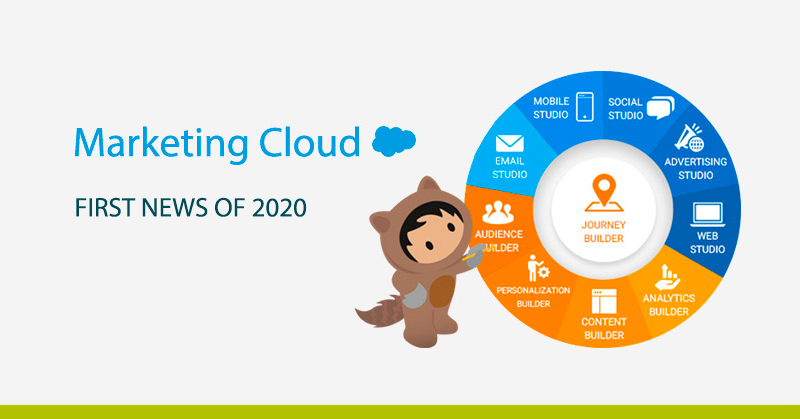
Salesforce has an annual cycle of three releases (Winter, Spring and Summer). In turn, this year’s Marketing Cloud will have 5 launches spread over January and October, which will bring many new features such as those we will see below.
If you already work with Marketing Cloud you will be interested in knowing all the changes that will be effective from February in the application, so pay attention to be up to date and get the most out of the new features and functionalities that Salesforce will introduce.
How many new features will there be in the Marketing Cloud?
Advertising Studio
Several modifications have been made within the Dashboard of Advertising Studio’s Lead Capture app. Users can now sort, search, filter, receive notifications, and more directly from the Lead Capture Dashboard (available on the AppExchange).
Contact Builder
Contact Builder has undergone two small modifications that will be of great help to the users of the Marketing Cloud. On the one hand, within the “Data Extensions” tab, a column called “Record Count” will be included in which the number of records per Data Extension can be seen. On the other hand, within the “All Contacts” tab, there have been 3 changes in the name labeling, thus changing its name:
SMS will be Mobile Connect
Push will be MobilePush
OTT will be GroupConnect
Content Builder
From this release, images hosted on Sitecore Content Hub can be added to emails and content blocks. In addition, it will be possible to add tags from the library to each file and a backspace icon will be included in each file type.
Journey Builder
Starting with this first release in 2020, simple submissions can be created, sent and monitored from Journey Builder with a single click, distinguishing between a multi-step journey and a single entry, single submission journey. Also, user permissions will begin to affect the creation of journeys in Journey Builder, meaning that if a user does not have sufficient permissions to create emails or view Data Extensions for example, they will not be able to access this functionality in Journey Builder (to correct this type of error the ideal is to give the user the role of Cloud Marketing Manager).
Social estudio
Social Studio is taking a big step this 2020 with a great series of new features. First, you can create Instagram stories from Social Studio and assign them to a mobile user for later publication (all through notifications). Secondly, through Command Center Instagram hashtags can be used as a data source. Finally, accounts associated with Facebook, Instagram or Google My Business can be removed from Social Studio, which is quite useful considering that previously only some of the pages could be transferred to a new user (this functionality is ideal in case the person in charge changes jobs or leaves the company for example).
Email estudio
As we will see in the next section, in Email Studio there have been a few changes that will remove previous features.
Einstein Marketing Insights
This app within the Marketing Cloud allows you to further analyze the performance of mailings made in Email Studio or Journey Builder by discovering factors that affect the behavior of subscribers. In this way, Einstein Marketing Insights will allow from the new launch:
To measure the impact of the subject lines in emails, allowing to know the most used subjects, the ones with the best performance, the most used lines and phrases and the hypothetical impact regarding the open rate.
Discover anomalies with respect to the performance of emails sent during the last 90 days, and warn of any anomalies through notifications.
Possibility to choose the appropriate period of time to send an email through Einstein Send Time Optimization (STO).
Mobile Studio
Like Social Studio, Mobile Studio grows exponentially and incorporates new and interesting features such as:
Import contacts within GroupConnect through the Import Wizard or via API and delete unwanted LINE messages in the main menu.
Access the Mobile Connect Administrator pages from Setup and associate campaigns with SMS activities in Journey Builder.
Activate rich media notifications in MobilePush Administration.
Updated version of MobilePush SDK with advances for iOS 13, geolocation messaging and more.
Web Studio
The only new feature of Web Studio is the inclusion of permissions for CloudPages, so you can manage access to CloudPages, both the permission to view, edit, publish, etc.
In addition to all the above developments, there will be new features to improve the user experience of both the content creator and the Cloud Marketing Manager.
Functionalities that will pass to a better life
It’s not all news in this early-year release, as Salesforce has decided to remove a number of cloud marketing features. The features that will come to life are as follows:
Cloud Marketing Campaign Approvals. This functionality will disappear from the Marketing Cloud and therefore Content Builder Approvals will have to be used to approve emails.
Classic Approvals. Like the previous one, this form of approval will be removed from the Marketing Cloud.
Creation of Classic Live Content. To replace this functionality we can use the live content of Content Builder Block SDK.
Creation of Classic Emails. This functionality will be removed from June 2020.
Salesforce Marketing Cloud Connector for Microsoft Dynamics 2011. This connector will support integration with versions of Microsoft Dynamics 2013 or higher.
Elimination of Select All Checkbox within Synchronized Data Extensions.
Conclusions
With its cyclical system of annual releases, Salesforce enables a major improvement within the Marketing Cloud that this year will be reflected above all in providing a better user experience. Thus, we have seen that functionality related to “Classic Content” will gradually disappear from the platform to give more weight to apps within the Marketing Cloud as Social Studio, Mobile Studio or Journey Builder, which are in the process of growth and adaptation within the platform.
In addition, life will be made easier for the Cloud Marketing Manager, allowing him to assign a wide variety of roles to different users (allowing him to better segment the work team) and providing him with new tools available to everyone from the main Administration menu.
Carrying out a correct use within the Marketing Cloud is a task that requires care and experience, but from ShowerThinking we are specialists in developing together with your company programs of automation and management of Marketing through platforms like Marketing Cloud. Therefore, if you need help or training in Cloud Marketing we have the right team that can help you, so do not hesitate to contact us!
Contact Builder is the application within the Marketing Cloud that provides access to account contact data and relationships designed to be used conveniently. With Contact Builder, we can manage, consolidate, organize and link data from all of the Cloud Marketing applications and external sources. If you’re not yet familiar with the Salesforce Marketing Cloud and […]
In relation to the topic I already mentioned in this post about Salesforce Certifications, I’m going to try to solve your doubts about how to take the exam for Cloud Email Marketing Specialist. First things first: there are four exams to obtain the complete Cloud Marketing Certification: Cloud Marketing Manager: Designed for administrators who […]
The Salesforce Marketing Cloud is one of the most comprehensive marketing platforms on the market. It has different modules that cover most of the needs of a modern marketing department, such as Social Studio for managing social networks, Advertising Studio for managing advertising campaigns, Mobile Studio for mobile communication or Email Studio for communication via email. If you still don’t know what Marketing Cloud is or you need more information about the platform, I invite you to read the following article that deals in depth with What is Marketing Cloud? Salesforce’s Digital Marketing Hub.
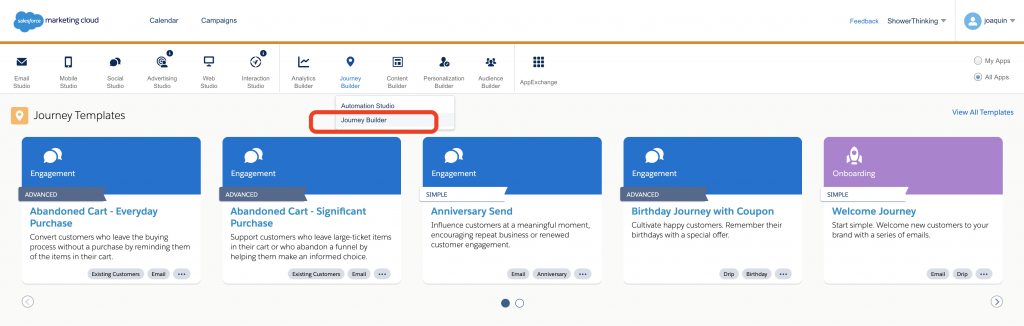
The Contact Builder section is responsible for maintaining subscriber relationship data. If you want to see a more detailed explanation of Cloud Marketing, I recommend watching my video on youtube about the different parts that make up the platform.
Journey Builder is the core of the platform and is where the Journeys we want to establish with subscribers/customers are configured.
What is Journey Builder?
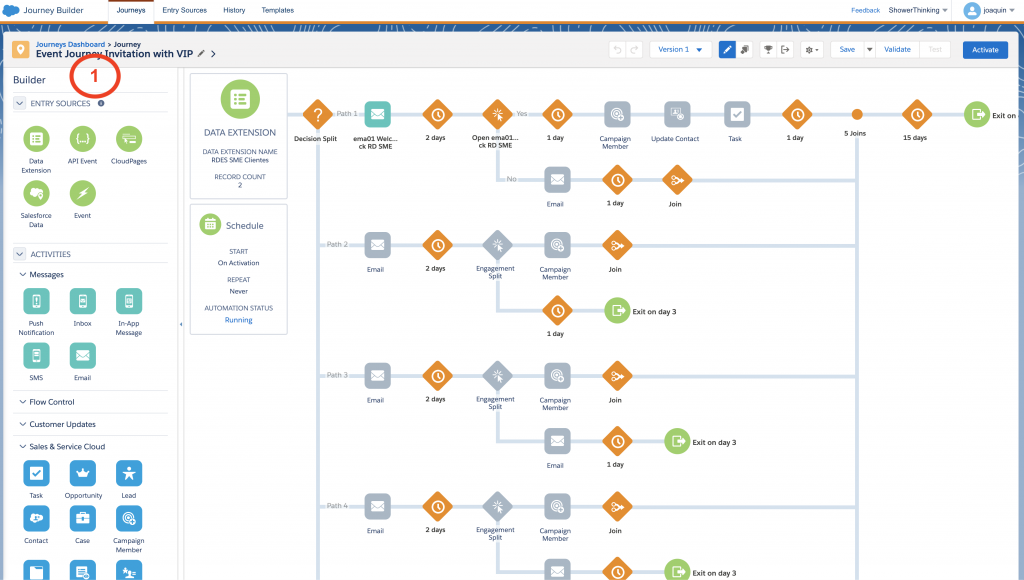
Journey Builder is the part of the Marketing Cloud that serves to create paths of interaction with customers or Customer Journeys. The way to generate these journeys is through visual programming, for which we will use the Canvas of the application.
The canvas is divided into a first vertical column on the left, which are the elements that you can drag and drop into your Journey (marked in the image with the number 1). You will see that there are 5 different categories of elements that you can include in a Journey: Entry Sources, Activities, Messages, Flow Control, Customer Updates and Sales & Service Cloud.
One of the most interesting elements that we can introduce in a Journey are the activities related to the Sales Cloud since we can Create/Update Contacts, Opportunities, Leads, Add members to a campaign or Create/Update any type of object in the Sales and Service Cloud.
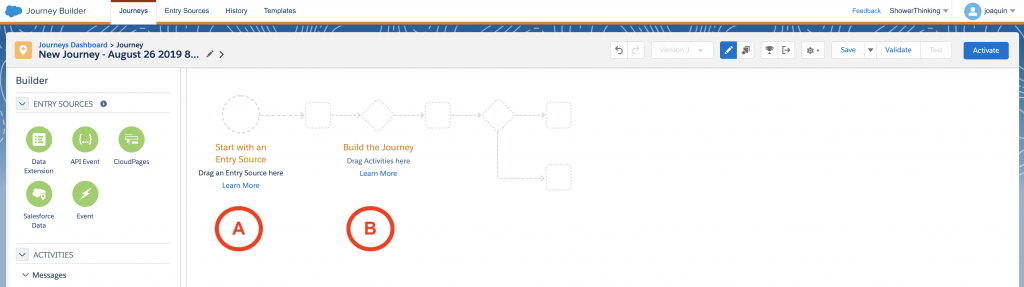
The programming of each Journey is divided into 2 distinct parts: Entry Source are the elements that trigger the Journey (marked with A in the image) and cause us to introduce a user into the flow. On the other hand there are the elements of the Journey (marked as B) that program the interactions that we are going to do with the users.
In the Journeys that we will see next, you will see how you must establish a series of user input sources in a journey together with a more or less complex programming of the steps that we are going to establish with them.
The 5 Essential Journeys
There is multiple technical information in Salesforce itself that describes this part of the tool, but from a marketer’s point of view it is necessary to understand how to develop customized customer communication programs. One of the easiest ways to learn it is to know how other customers use it.
That is why we are going to review 5 cases in which I have worked in different companies within their Marketing Cloud implementation projects. It has been complicated to choose which Journeys would be chosen for this publication, given that dozens of different Journeys have been implemented over time.
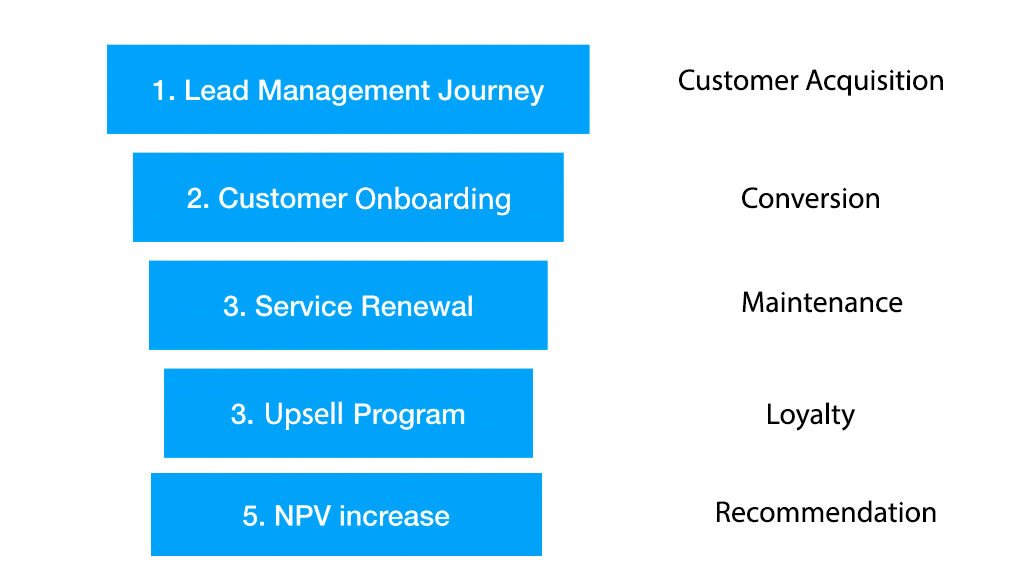
Thinking about which would be the clearest and most didactic way, I present them to you starting with the simplest ones. They are ordered according to the different states of a supposed conversion funnel. Therefore, I present the 5 Journeys suitable for each stage, hoping that they can serve as inspiration for your project.
1. Lead Management Journey (customer acquisition)
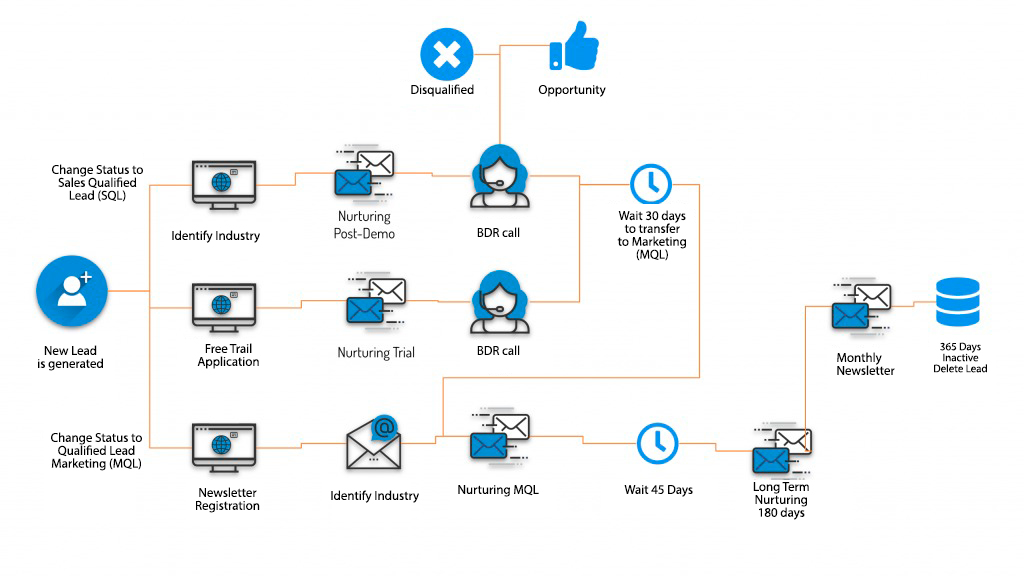
Establishing an orderly and precise customer acquisition process is a priority for every marketing team. The example we will see below is a simplification implemented for a technology company that offers complex IT/IT security products for its clients in Spain and Latin America.
Several types of lead capture campaigns land on the client’s website (Organic, Paid Media and Events especially) since part of the client’s products are based on an Open Source solution. There is a large niche community interested in security solutions.
The recruitment strategy is based on the early identification and qualification of companies interested in the client’s product. This is done through a product demo or a Free Trial. This modality of Journey can be extrapolated to different companies that commercialize products (like this case) or services.
The first point to comment is that the capture of leads is done through campaigns that direct customers to different forms on your website. Some of them allow the customer to sign up for the monthly newsletter, but the most important ones allow the customer to request a product demo (video conference) or a Free Trial.
The process coordinates the interactions between a sales team (called business development representatives or BDRs) and the Marketing Automation platform. Once the potential client requests a demo/trial or registration in a newsletter, he or she will enter a Journey where the sales team will perform a demo (and at the same time be able to qualify the sales opportunity) or obtain feedback on the trial that the client has performed and at the same time see how the product can fit into the organization.
The call to the client by the sales team after the trial period is a critical moment where the opportunity is qualified or disqualified with the client. A waiting time of 30 days is generated and the closing date of the opportunity is updated in case of not having a clear answer. Once this time has passed, the lead is transferred back to Marketing in case a sales agreement cannot be closed.
The leads enter into a Nurturing process extended by 6 months with a special follow-up, and in case this period of inactivity is exceeded it is transferred to the monthly newsletter list of the company. In case of inactivity for 365 days, the lead is discarded.
How this journey is implemented in Marketing Cloud
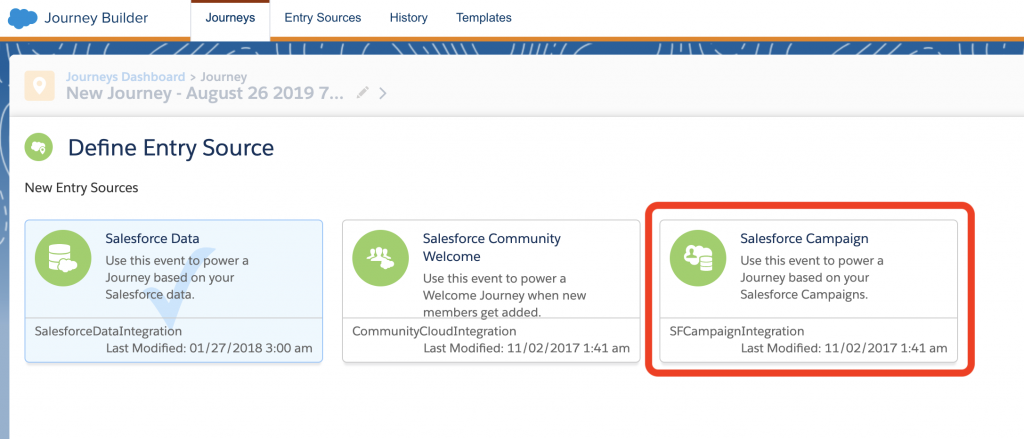
The first interesting point to highlight is how the leads generated in this Journey are introduced. In previous steps of the project, the client’s website and its integration with the Sales Cloud had been developed. So, using existing web to lead forms on the client’s website, new leads are generated and assigned to salesforce campaigns.
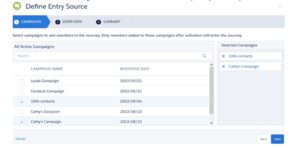
To reuse this functionality, the marketing cloud entry source is based on the entry of leads in the appropriate campaign.
Therefore the leads enter the appropriate Journey in coordination with their entry into a specific salesforce campaign.
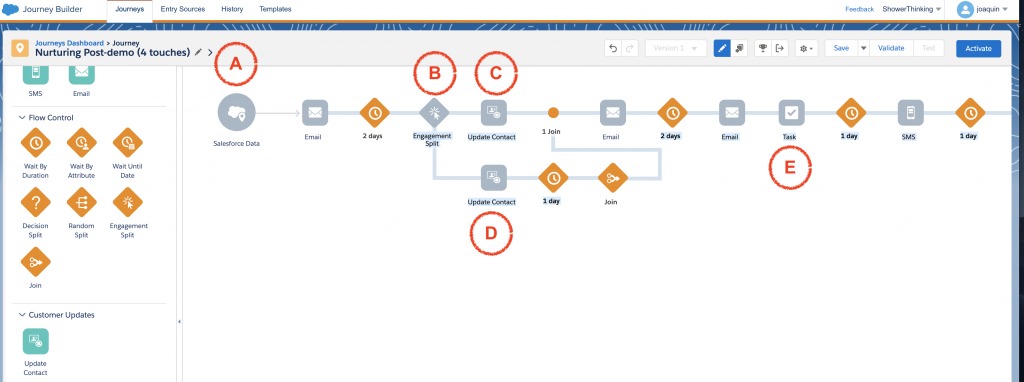
Let’s see below how follow-up calls can be implemented after a demo by the sales team (Nurturing Post-demo). Below is a simplified Journey in the Marketing Cloud about its implementation.
As always we are launching this Journey based on the contact’s entry into a campaign. These campaigns are coordinated with the team of sales representatives.
In point B we make a Split engagement (decision on whether the client opens the email or not) to update the client’s activity (if he opens it we increase his activity in point C or decrease it in point D).
Finally, in point E we generate a task for the assigned representative the day before the call attempt by the sales team. We finish by sending an SMS the morning of the call to confirm the appointment.
I hope this example has helped you to establish the best way to implement your Journey with clients in your projects. In the next articles we will review different techniques to implement them.
Knowing the best way to implement a marketing campaign on Marketing Cloud requires experience in multiple projects and technical support. The first steps in the platform always generate doubts. In ShowerThinking we are specialists in developing with your company programs to automate marketing campaigns. If you need help or training in Marketing Cloud we have the right team that can help you.
Understanding what Reply Mail Management is when working in the Marketing Cloud is essential if you want to have a transversal communication between the company and the customer. If you need help in its configuration and in understanding all the functionalities that Marketing Cloud offers regarding Reply Mail Management, you are in the right article. […]
If you have reached this post, it is probably because you have difficulties in understanding what a Sender Profile is when you work with the Marketing Cloud. Read on to find out what a Sender Profile really is, the possibilities it offers to get the most out of it and everything it brings to you […]
We use cookies on our website to give you the most relevant experience by remembering your preferences and repeat visits. By clicking “Accept”, you consent to the use of ALL the cookies. However you may visit Cookie Settings to provide a controlled consent.
This website uses cookies to improve your experience while you navigate through the website. Out of these cookies, the cookies that are categorized as necessary are stored on your browser as they are essential for the working of basic functionalities of the website. We also use third-party cookies that help us analyze and understand how you use this website. These cookies will be stored in your browser only with your consent. You also have the option to opt-out of these cookies. But opting out of some of these cookies may have an effect on your browsing experience.
Necessary cookies are absolutely essential for the website to function properly. This category only includes cookies that ensures basic functionalities and security features of the website. These cookies do not store any personal information.
Cookie
Duration
Description
cookielawinfo-checkbox-advertisement
1 year
This cookie is set by GDPR Cookie Consent plugin. The purpose of this cookie is to check whether or not the user has given their consent to the usage of cookies under the category 'Advertisement'.
cookielawinfo-checkbox-analytics
1 year
This cookie is set by GDPR Cookie Consent plugin. The purpose of this cookie is to check whether or not the user has given the consent to the usage of cookies under the category 'Analytics'.
cookielawinfo-checkbox-necessary
11 months
This cookie is set by GDPR Cookie Consent plugin. The cookies is used to store the user consent for the cookies in the category "Necessary".
cookielawinfo-checkbox-non-necessary
11 months
This cookie is set by GDPR Cookie Consent plugin. The cookies is used to store the user consent for the cookies in the category "Non Necessary".
cookielawinfo-checkbox-performance
1 year
This cookie is set by GDPR Cookie Consent plugin. The purpose of this cookie is to check whether or not the user has given the consent to the usage of cookies under the category 'Performance'.
cookielawinfo-checkbox-preferences
1 year
This cookie is set by GDPR Cookie Consent plugin. The purpose of this cookie is to check whether or not the user has given the consent to the usage of cookies under the category 'Preferences'.
viewed_cookie_policy
11 months
The cookie is set by the GDPR Cookie Consent plugin and is used to store whether or not user has consented to the use of cookies. It does not store any personal data.
Any cookies that may not be particularly necessary for the website to function and is used specifically to collect user personal data via analytics, ads, other embedded contents are termed as non-necessary cookies. It is mandatory to procure user consent prior to running these cookies on your website.
Cookie
Duration
Description
__cfruid
Persistent
The ‘__cfduid’ cookie is set by the CloudFlare service to identify trusted web traffic. It does not correspond to any user id in the web application, nor does it save any personally identifiable data
test_cookie
11 months
This cookie sets DoubleClick (which is owned by Google) to determine if the website visitor's browser supports cookies.
Analytical cookies are used to understand how visitors interact with the website. These cookies help provide information on metrics the number of visitors, bounce rate, traffic source, etc.
Cookie
Duration
Description
_ga
2 years
This cookie is installed by Google Analytics. The cookie is used to calculate visitor, session, camapign data and keep track of site usage for the site's analytics report. The cookies store information anonymously and assigns a randoly generated number to identify unique visitors.
_gid
1 day
This cookie is installed by Google Analytics. The cookie is used to store information of how visitors use a website and helps in creating an analytics report of how the wbsite is doing. The data collected including the number visitors, the source where they have come from, and the pages viisted in an anonymous form.
GPS
30 minutes
This cookie is set by Youtube and registers a unique ID for tracking users based on their geographical location
pardot
The cookie is set when the visitor is logged in as a Pardot user.
Advertisement cookies are used to provide visitors with relevant ads and marketing campaigns. These cookies track visitors across websites and collect information to provide customized ads.
Cookie
Duration
Description
IDE
2 years
Used by Google DoubleClick and stores information about how the user uses the website and any other advertisement before visiting the website. This is used to present users with ads that are relevant to them according to the user profile.
VISITOR_INFO1_LIVE
5 months
This cookie is set by Youtube. Used to track the information of the embedded YouTube videos on a website.
Performance cookies are used to understand and analyze the key performance indexes of the website which helps in delivering a better user experience for the visitors.
Cookie
Duration
Description
YSC
Session
This cookies is set by Youtube and is used to track the views of embedded videos.
YTC
10 minutes
This cookie is set by Youtube to manage the embed and viewing of videos on our website
Preference cookies are used to store user preferences to provide content that is customized and convenient for the users, like the language of the website or the location of the visitor.
Cookie
Duration
Description
_gat_UA-2503304-40
1 minute
This is a pattern type cookie set by Google Analytics, where the pattern element on the name contains the unique identity number of the account or website it relates to. It appears to be a variation of the _gat cookie which is used to limit the amount of data recorded by Google on high traffic volume websites.