Salesforce Marketing Cloud Consultant Certification

Certificación email specialist

Are you looking to take the last step on your path to becoming a Marketing Cloud expert? If so, keep reading to learn everything you need to know about consultant certification.

Everything you need to know about the Cloud Marketing Consultant exam

All Salesforce certifications require prior study and training, but the Cloud Marketing Consultant certification is considered one of the most complicated to obtain due to all the previous knowledge you need to have about Cloud Marketing, the complicated questions, the case studies and the technical difficulty.

If you want to apply, the first thing you need is to get the Marketing Cloud Email Specialist certification. You can find more information about it here (enlace al artículo del blog nuestro). I strongly recommend that you also get the SFMC Administrator certification. While it’s not mandatory, it will help you understand the marketing platform and make it easier for you.

Secondly, let’s take a closer look at what the exam consists of. Like almost all Salesforce certifications, it is a test of 60 questions (plus 5 that are not scored) that you must answer in 105 minutes without the help of any kind of material or external agent. These questions are related to various topics in the Marketing Cloud world, but their importance in the exam (the percentage) varies depending on the exam and the edition itself. If you are applying for the Winter 22 Marketing Cloud Consultant edition, these are the current rates:

  • Discovery & Architecture: 16%
  • Integration: 20%
  • Account Configuration: 12%
  • Automation: 20%
  • Data Modeling & Management: 21%
  • Messaging: 11%

As a recommendation, focus on preparing as well as possible those blocks that are most important, because they will have the most questions on the exam. To do so, read on and find out where to get free SFMC Consultant exam questions.

How to prepare yourself to become a SFMC Consultant

As you know, the Salesforce platform itself offers courses and preparations that you can find in Trailhead (here I show you one with the study guide included).

Another very interesting place is the Trailbazer Community. There you will find accurate questions from the exam and, above all, discussions about the correct answers. This exam is famous for the ambiguity of its questions, and it is interesting to be a member of this community to see how people solve the questions and in what way you can deal with them whenever you take the exam. If you are interested in joining, here is one of the forums about Consultant exam questions.

My experience confirms that this is not enough to get this certification. Salesforce recommends you to have at least 6 months of experience in implementing technical solutions in Marketing Cloud projects. And still, I think that the key of this exam is not only about your knowledge of the tool, but also about learning the type of questions or how to deal with them. For that, you can make use of academies like Udemy, that will provide you with extensive and detailed courses in which you will see each of the modules of which the exam is composed. Of course, always paying. You can also find others like Salesforce Help & Training.

What you should know about each module

1. Discovery & Architecture

This module is practically based on your experience with Marketing Cloud. The questions will be about case studies that ask you to find a solution with the tool. If you have not faced it in real life, it will be difficult for you to do it in an exam.

You will need to know how to manage the available information to achieve the most accurate audience segmentation strategies possible, as well as long-range technical solutions for the maintenance of these strategies.

2. Integration

As the name suggests, you will be presented with use cases on Marketing Cloud Connect integration. Again, your own experience with the platform will be what will make you pass them.

3. Account Configuration

Something quite similar to what you could find in the Marketing Cloud Administrator Certification, it is much easier to prepare since you can study it but it is no less important. The Marketing Cloud account configuration is the basis of any project you are going to do. My advice: check basic but very necessary concepts such as SAP, Reply Address Management, etc.

4. Automation

It is one of the most important modules, but also one of the easiest in my opinion. You must think about what kind of activities you have to do with an automation for a specific journey or case study. Familiarize yourself with SQL code and Scripts, because you will need it for this block. If you are scared of code because you are not very technical, lose your fear of it. From my point of view, automation is one of the great advantages of Salesforce. The sooner you know about how to use it yourself (with your own codes and developments) the more self-sufficient you will be and, therefore, the better projects you will do.

5. Data Modeling & Management

If I could choose one vital module in Marketing Cloud, it would be this one. Not only because it is the one that occupies the largest percentage, but also because it is very important that you understand in depth the data model you are working with, the implications it has on the records and the possibilities it gives you for the scope of your project(s).

Here’s another unsolicited tip: if you want to be a good Marketing Cloud consultant, investigate this module and double check what level of knowledge you have about the data model you are using and how fields and objects are connected to each other, because it is the basis of everything.

6. Messaging

Finally we come to the last module of this exam, and certainly the easiest. You will see questions about how to personalize and individualize communication campaigns. This is already covered in previous certifications such as Administrator (enlace al artículo del blog nuestro) or Email Specialist, although in a more basic way.

I hope these tips have helped you to learn a little bit more about the certification and you are ready to learn about the world of Cloud Marketing Consulting. It requires effort, but you will also get a great compensation: to be a better professional in your industry. There are some certifications that do not provide great knowledge, but not in this case. So: Remember! When you are preparing yourself for it, keep in mind that it is not “just another certification” and that’s all. SFMC Consultant certification is really useful and you can take advantage of it for your future projects.
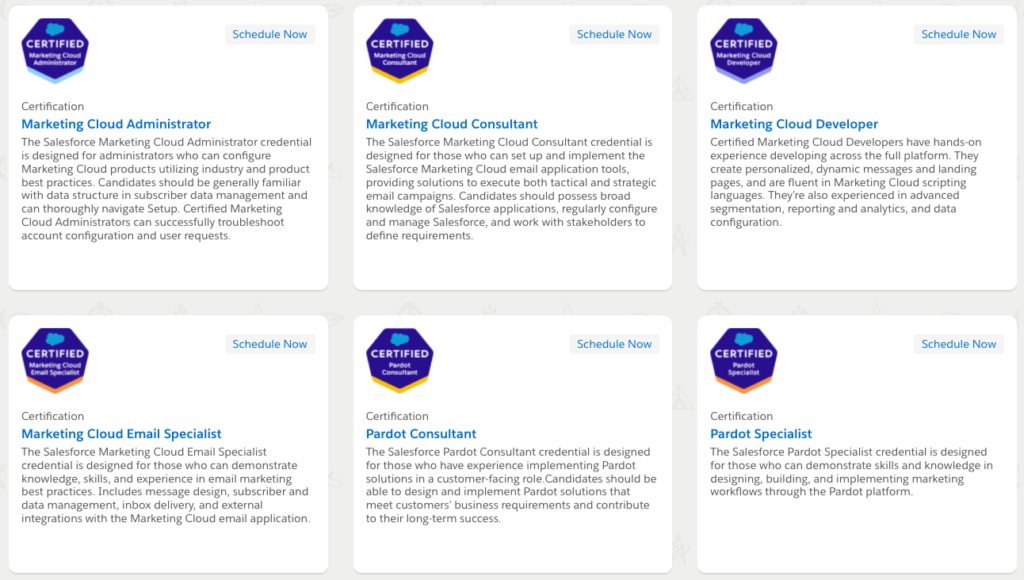
Salesforce Marketing Cloud Admin Certification

Porrada blog SFMC

Following on from the post about Salesforce Certifications and along the lines of Marketing Cloud Email Specialist, I’d like to explain a bit more about what the Marketing Cloud Admin exam is all about. This post is written as a guide to help those people who are interested in obtaining this certification and to give details and tips about it.

Who can take the exam?

It is a certification oriented to people who are interested in the configuration of Marketing Cloud products. It is also required in order to obtain the Marketing Cloud Consultant certification. According to Salesforce’s recommendation, it is advisable for those who decide to take this exam to have 3 to 6 months of experience in Marketing Cloud administration and previous experience in Digital Marketing.

As this is a more technical profile, whoever wants to get this profile must be familiar with the data structure, configuration and have agility and ability to solve problems that may arise in the account. They must be able to navigate the tool.

By becoming certified you will become a profile that is currently highly demanded, with the ability to create personalized experiences for each business/user. You will open up new opportunities to help others.

Salesforce recommends you to study using the modules specifically created for this exam, in which all the certification topics are covered. If you are brand new to the Salesforce Marketing Cloud world, I’d recommend you to start with the Trailheads which they offer. The estimated time is approximately 25-35 hours but if you already have experience with other certifications or with Salesforce Marketing Cloud itself you will probably be able to complete them in less time.

Certification SFMC

However, it is not the only place where you can study. There are other tools such as Udemy, Salesforce Ben, doing practice exams, and most of all with Salesforce Help articles which which you will be able to find complementary information to the Trailheads.

About the exam

In this section of the article I will detail the structure of the exam:

  • Content: 60 questions that score + 5 questions that do not score*

These 5 unscored questions are used to evaluate the general level of the candidates taking the exams. They will serve as a guide for the annual updates of the certifications.

  • Time: 105 min
  • Passing score: 67%
  • Location: you can either do the exam online or in a specialized facility
  • Language: English
  • Pre-requirements: None
  • Cost: USD 200, plus applicable fees/ taxes
    • Retaking costs: USD 100, plus applicable fees/ taxes*

Take into account that at these costs you might have to add applicable fees or taxes according to local laws.

Topics

  • Digital marketing proficiency: 13%
  • Subscriber data management: 18%
  • Setup: 38%
  • Channel management: 16%
  • Maintenance: 15%

Digital marketing proficiency

  • Know the details of the security of the program (CAN-SPAM, reporting metrics)
  • Know with accuracy all the types of permissions and roles, as well as PII (MFA, Users, handling of APIs, tenants, Google Analytics 360º, etc.)
  • Best practices

Subscriber data management

  • The ability to comprehend and manage the contact models in different situations (Contact Builder,RMM,Data Designer)
  • Understand perfectly the concepts of preference y profile center

Setup

Channel management

Maintenance

  • Know how to navigate through the different products desenvolverte por los diferentes productos de Marketing Cloud, reports, data extracts, etc.

Tips

Important before starting: you should ensure that all the information you have or will be using is completely uppdated, The certifications are continuously being updated. Let me walk you through on how to prepare:

  • Follow the Trailhead modules for preparation
  • Read articles from the Salesforce Help where you can can find additional information that can help you understand many of the issues or cases that may arise in the exam questions.
  • I’d also recommend you to check out the AMPscript guide

The questions are similar to those from other Salesforce Marketing Cloud exams. As a matter of fact, many questions are based on real situations which test your knowledge and technical problem-solving abilities with the tool.

It is very important to understand that to be able to pass this exam successfully, you cannot simply memorize the topics, as you need to be able to apply what you’ve learned, understanding all the terminology, and apply them in the relevant cases.

Real exam experience

In my case, I decided to certify myself as it is a prerequisite to obtain the Marketing Cloud Consultant certification. It took me about 2 to 3 months to prepare myself for this exam with the help of Trailheads, Salesforce Help Articles and a lot of patience.

It wasn’t my first certification so I already knew the dynamics and the type of exam I was going to face. The process that I usually follow is:

  • First of all I search and complete the Salesforce Trailhead which prepares you for the exam, always making a small summary of the most important items which will later on help me when I am doing the first mock tests and I can consult on them in case of doubts
  • As a second step, I write down keywords with their definitions that appear in the mock tests that don’t appear in the Trailheads. In this way it is much easier and quicker to consult future doubts.
  • Finally: tests, tests, tests. This is what will most help you understand the possible cases which may be raised in the exam.

I would recommend you to go to an examination facility to conduct the test if you can, as if you do it at home or somewhere else, you will have ensure that you comply and follow the technical requirements to conduct the online proctored exam and this might distract you preparing for the exam.

The most important thing, if you have the opportunity, is to practice with the tool itself when you’re studying because it will make it easier to comprehend and remember better than only reading about it.

Don’t worry if you don’t pass on your first try. It is a lot of content and it is very important to get yourself well familiarized with all the questions and topics before attempting the exam, but I encourage you to try again!

Sales Marketing Cloud October 2021 Release

Salesforce October 2021


Salesforce Marketing Cloud received a fresh upgrade in October as part of Salesforce’s enhancement plans. These enhancements have been implemented to provide a better platform experience and to do your jobs as marketers simpler. Let’s explore the updates in the October release.

iOS 15 Updates

Apple unveiled a plethora of new improvements for its iOS 15 releases in the fall of 2021 during the summer of 2021. Like those in previous upgrades, some of these unique updates were meant to provide users with greater and better authority over who has access to the information. Three of them, in fact, are for Apple Mail and have a direct bearing on those of us who work in online marketing. Let’s explore these iOS 15 updates now.

What Salesforce Is Doing Against These New Changes?

Some email clients are changing their privacy policies, which may affect open rate numbers and computations. Salesforce is upgrading a number of Marketing Cloud products to adapt certain functionalities of its platform as a consequence of the changes implied by the new privacy policies.

Salesforce’s main focus is to develop technologies that will assist you in responding, acting, and succeeding in these changing contexts. Email openings have historically been used by marketers to construct automated processes, marketing engagement methods, and more since they may indicate whether a client or prospect is intrigued by your material. Email openings are likely to be a less trustworthy interaction indication as a result of the additional privacy settings offered to customers.

Over the course of the next several updates, Salesforce will make a number of changes to your Marketing Cloud services, focusing on Einstein functionalities. This will guarantee that your data, findings, and projections are as precise as possible. 

  • Rather, they’re using an engagement rate measure that combines a variety of extra signals, such as clicks, while still taking account of open rate analytics at a certain level to provide a more comprehensive view of your consumers’ content interaction. Here are the topmost improvements you can expect:
    • To calculate the most ideal send time, the algorithm now employs an engagement rate rather than just an open rate for a more sophisticated statistic that ensures greater accuracy.
    • To produce behavioral analytics and estimate future effectiveness, the Insights feature now leverages the audience engagement rather than only the open rate.
    • For more precise output statistics, click to open rates are now calculated as click through rates.
    • Rather than using an intersection between open and click rates, Salesforce will instead utilize an engagement rate for profiles. As a consequence of the privacy modifications, they’re revising the metrics computations in Engagement Scoring to improve dependability.

Impact On Marketing Cloud

The open rate, which is closely watched, will be the most evident effect of these modifications. Most marketers will no longer be able to know if their Apple Mail app customers read their messages, when they opened them, their geographical location, or which gadget they used to do so following this upgrade.

Marketing Cloud Journeys and Messages

This is an upgrade to the next-generation MobilePush SDK, which uses Mobile App Events to arrange journeys depending on user activity. It adds action hooks to enable user behavior to influence your in-app messaging, and it improves in-app message scheduling with increased display options.

The new Journey History UI allows you to view your journey metrics. With Partner Seed List Connectivity, you may also get a better understanding of subscriber retention. Contact Deletes now have a two-day suppression duration.

The new Journey History panel offers a more informative, visually appealing, and engaging experience and new possibilities. Integrated infographics and statistics, a simplified filtering interface, navigation, and more are all available.

To choreograph experiences or trigger in-app messaging depending on real-time user behavior, Marketing Cloud now offers a direct connection between your mobile app and Journey Builder. 

You can also specify your smartphone app activities on the new Journey Builder Mobile App Event Management Tab. Alternatively, you may leverage the user’s smartphone app activity to prompt the appearance of an in-app message.

Better In-App Messages

In-app messages are known to enhance productivity and customer engagement. Wouldn’t it be better if you could better control the timing and triggering action for displaying in-app messages? This is what you get with the new Salesforce Marketing Cloud October 2021 Release.

You can define different parameters for session length and user actions to trigger in-app messages for your users. Therefore, you can easily guide them and control their journey with better control.

different identities in the different channels and creating an unified profile that groups: contact data, their interactions and the metrics related to their interactions. And all this in real time.

Default Suppression Period

Before this update, clients had to wait a minimum of 14 days for suppression period for contact deletes. However, with the new update, you can set the duration between 0-2 days to delete the contacts quicker. This way, you can say goodbye to the 14-day wait period and delete contacts on the same day. 

Similarly, if you set the suppression period to 0 days, the contact deletion process will not pause automatically after the first suppression round. It will keep on functioning as desired and you can reduce the delay time for contact deletion and suppression.

Emailapocalypse: What Apple Mail Privacy Protection Means for Marketing Cloud

Mail Privacy Protection

Privacy is coming to the internet while cookies and tracking pixels are going away. Apple is leading a major change in the email marketing landscape with the introduction of Mail Privacy Protection among other new features that professionals and software providers will need to adopt.

Although these changes imply far-reaching effects for many providers, we will specifically discuss some considerations for Salesforce Marketing Cloud. Let’s start from the basics…

This summer 2021, Apple announced a slew of new features that would be introduced with its iOS 15, iPad 15, and MacOS Monterey releases to come this fall 2021. As with past updates, some of these new features were designed to offer users more and better control over the access that others have to their data. In fact, 3 of them are for Apple Mail and have a specific impact on those of us that work in email marketing.

This is nothing new for Apple. Over the past few years, Apple has been tightening up on user privacy. In recent updates it introduced new features that blocked all third-party cookies and required applications to ask for users’ permission to track their activity outside of their own apps. Ultimately, this is what users want. So we can only expect this trend and similar changes to continue.

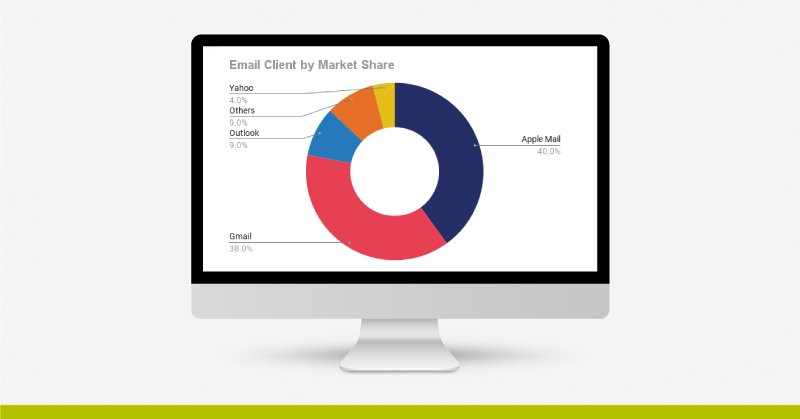
So, considering how Apple Mail takes up around 40% of email client market share, you may be very interested in knowing just what these newest features are and if they will have an impact on what you do, specifically in Salesforce Marketing Cloud. 

In this article we’ll look at the following: 

  1. What are these 3 features?
  2. How will they affect email marketing and Salesforce Marketing Cloud?
  3. Can you prepare for this change?
  4. How can you adapt to this change?

Three New Apple Mail Features That Will Directly Impact Email Marketing

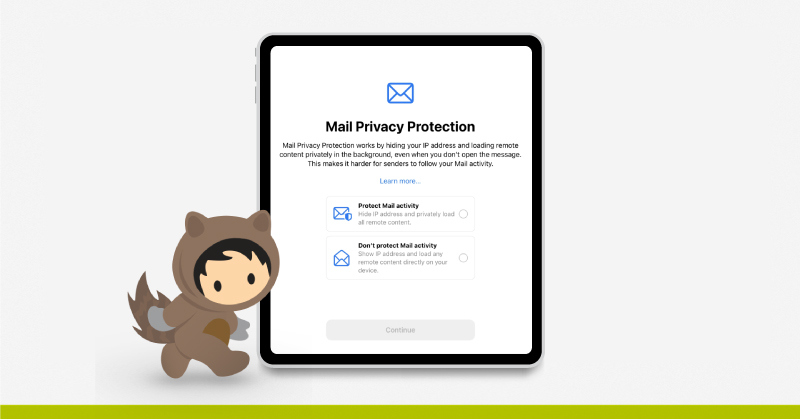
The main feature that will impact email marketing is the Mail Privacy Protection feature. When a user opens the Apple Mail app for the first time after the fall update they will see the Mail Privacy Protection feature, asking them if they want to have their Mail activity protected or not. (It’s safe to assume that most will opt for protection.)

How does this impact marketers? As Apple says:

“Mail Privacy Protection works by hiding your IP address and loading remote content privately in the background, even when you don’t open the message. This makes it harder for senders to follow your Mail activity.”

the Mail Privacy Protection

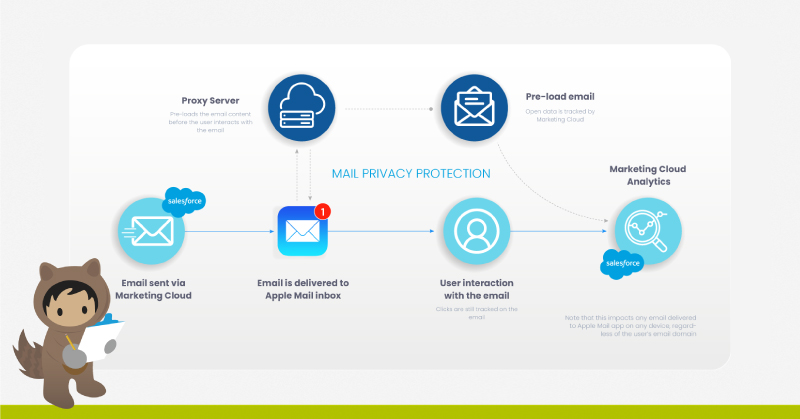
Feature #1: “Loading remote content privately in the background” – Marketing emails, newsletters, and some email clients use an invisible tracking pixel to track whether someone has opened an email or not. But with this new feature the emails are automatically loaded, or “opened”, in the background. So for marketers’ purposes, they will show as having been opened, even if they haven’t actually been opened.

Consider that Marketing Cloud includes a tracking pixel in each email to check if and when an email is opened. This feature will thus be affected.

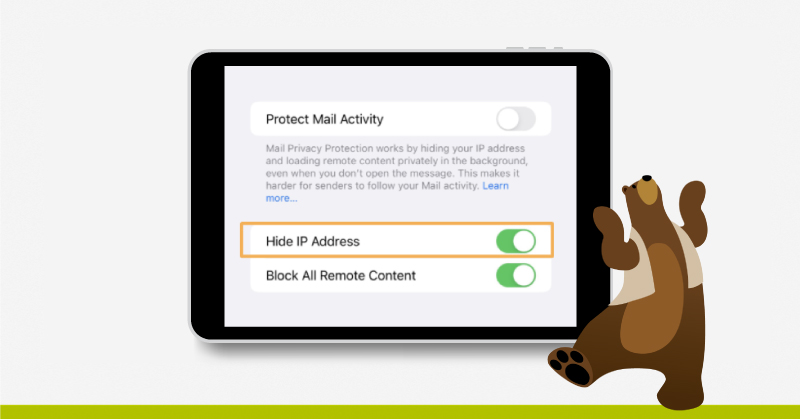
protect mail activity Mail Privacy Protection

Feature #2: “Hiding your IP address” – This means that senders will not be able to determine location or to link email habits to other online activity based on IP address.

Source: Apple.com

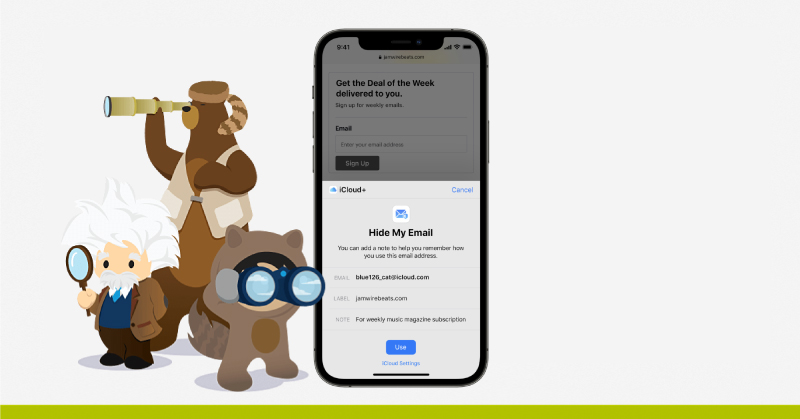
Feature #3: Hide My Email – Among the plethora of new features being released this fall for iOS15 and other OS’s is also iCloud+. This is a paid plan that offers such features as extra iCloud storage, Family Sharing, Private Relay, and Hide My Email.

Hide My Email will allow users to mask their email with a fake one. These “fake” emails are random Apple-created icloud.com addresses that provide users with the luxury of providing a type of “burner” address when they don’t want to provide their true address.

This feature will have a profound impact on email marketing since we will no longer be able to identify a specific user. In fact the number of duplications in our database will grow. It will be important to consider a proper consent management and deduplication strategy in your Marketing Cloud instance.

The below diagram gives you an idea of how Apple will implement these new features using a proxy connection between the user and the email services.

hide email

How Will These New Features Affect Email Marketing?

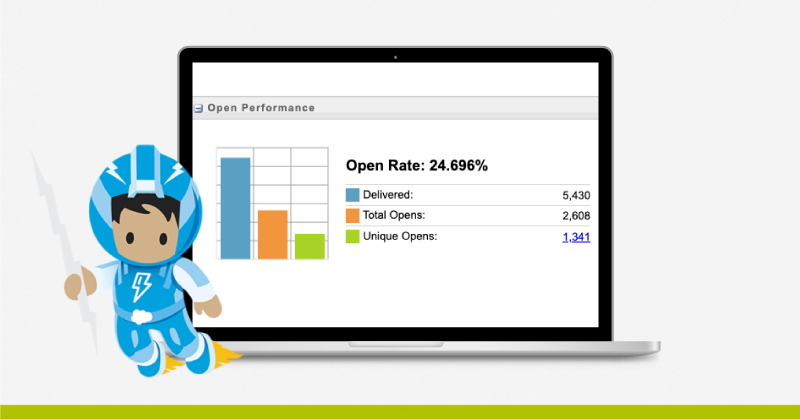
These changes will have a most visible impact on the heavily-monitored open rate. For most subscribers using the Apple Mail app after this update, you will no longer be able to tell if the recipients opened your emails, what time they opened, their geolocation, or which device they used to do so.

open rate Mail Privacy Protection

At first thought, the name Mail Privacy Protection might make you think that it would lead to a drop in the open rate. However, because emails will be automatically loaded “privately in the background” regardless of whether they have actually been opened or not, then rather than leading to a drop it will cause open rates to rise significantly, depending on the proportion of your subscribers that use the Apple Mail email client.

So if open rates become unreliable and geolocation is unavailable for many subscribers, that means that other aspects of email marketing will be affected. Here are some of the big ones:

  • A/B Testing by opens
  • Send time optimization
  • Re-engagement journeys and flows based on opens
  • Localized content based on opens or IP addresses
  • Monitoring deliverability and list hygiene

How to Prepare for Mail Privacy Protection

It’s important that we get a head start by taking a look at what we currently have. Here is a helpful checklist of steps you can take to get prepared.

  • Determine potential impact. Examine your audience and get an idea of what percentage of your subscribers are iOS, iPadOS or MacOS users. Even though the impact will vary based on whether they actually use the Apple Mail app or opt in to Mail Privacy Protection, it will give you a good idea of how large (or small) that segment is. Here’s a step by step guide to how you can use Marketing Cloud Reports to get an idea of these segments.
    • Click on “Reports” under the Audience Builder tab.
    • In the Report Catalog, use the Email Performance by Device report.
    • Change the view to Table View.
    • For the Rows, besides Mobile or Desktop, try adding some of the following: Device Model, Operating System Model, Operating System Name, Email Client Name.
    • For the Measures, besides the initial Opens and Clicks measures you might also try Unique Opens and Unique Clicks.
  • Clean house now, while you can. Take a look at your deliverability and list hygiene. How many unengaged subscribers do you have? It’s a good idea to focus on email deliverability while you can still use opens as a key indicator.
  • Create a reliable opens audience consisting of subscribers that are not using Apple Mail. If you wish to test opens at times in the future, this audience can be your guide.
opens audience

Source: www.t4.ai

(Apple Mail takes up on average 40% of the market. What about your audience?)

How to Adapt to Mail Privacy Protection

It goes without saying that for many in email marketing a world without reliable open rates will require significant effort to adapt. While each audience is different, here are some helpful tips to get you started.

  • Rethink what an engaged subscriber is for you. This means looking at other signs of engagement or combinations of such signs. That could be date of opt-in, unique clicks, purchases, on-site behavior, sign-ups for events and other touchpoints.
  • Establish new baseline metrics. CTR should be key, but keep an eye on other metrics that help to monitor your new engaged subscriber profile, or the opposite, such as the unsubscribe clicks.
  • For automation, set your splits and triggers to be click or time-based rather than open-based.
  • Take a long-hard look at your email UX and content. Does your design guide your readers to your CTA? Does your content motivate them to click? Is your content concise and direct? Is your email mobile-optimized? You would also do well to take a look at your subject lines and sender profile.
  • User identification. Hide my Email creates the possibility of different email addresses for the same user. So you will need to set up an appropriate deduplication and user-identification strategy.

Only More to Come

As mentioned before, privacy changes and Apple is nothing new. We can therefore expect that these changes continue, not only with Apple but that many other companies will follow in their footsteps, as is often the case. Rather than resisting, the best thing we can do is get on board ourselves and adapt to the preferences of users. Ultimately it’s a great opportunity to continually reassess and improve your approach to email marketing. 

Salesforce Marketing Cloud will probably adapt to this new change. With the 5 major releases of Marketing Cloud per year we can most likely expect to see new features to address these important changes.

In the meantime, we will all continue to adapt to the changing landscape of email marketing.

At ShowerThinking we’re always glad to help you on that journey.

5 Keys to Email Marketing Health and Pharma

5 Keys to Email Marketing Health and Pharma

As the limits and bounds of technology continue to expand, one thing continues as a constant in marketing: email is king. And as we drill down into the specific fields of health and pharmaceutical marketing, things are no different. Your email marketing campaigns play a significant role in your results.

So you’ve got consistent email marketing campaigns going. Great! And you’re using new technology like Salesforce Marketing Cloud to manage those campaigns. Even better! But maybe you’re not seeing the results you were looking for.

In this article we’ll take a look at 5 keys to improving your email marketing in the Health and Pharmaceutical fields.

1. Segmentation

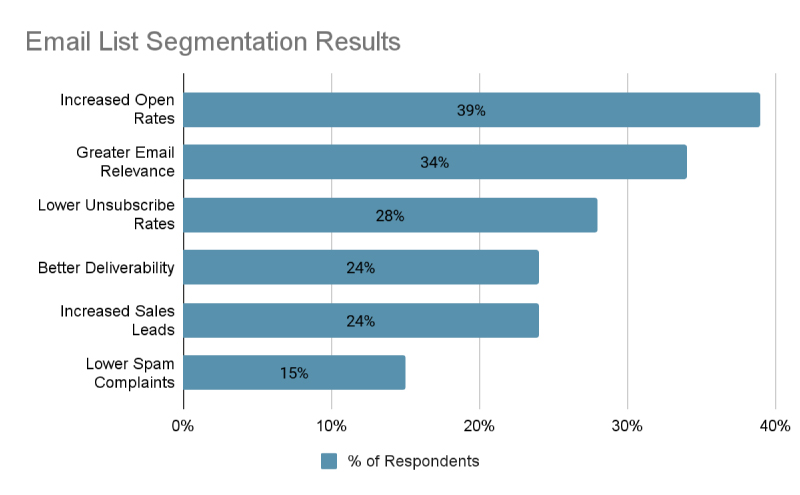
Segmented personalized email messages have been found to average 39% higher open rates than normal marketing emails.1 So make sure you are taking the time to personalize your emails and segment your audiences.

email list segmentation results

Source: Lyris, Inc.

Before beginning an effort to segment your emails, you first need to find out which segments you already have defined and which segments would be most useful to you. Certain segments might be a given, such as those based on specialty or geography. But there might be others that would be beneficial for you to analyze and identify.

Considering the benefits, any effort made in this area is always an excellent investment.

2. Content Is King: How is your CTA?

Attractive images and sharp design are also important when it comes to email marketing. Your Call to Action should reflect this. Users have become accustomed to receiving well-designed, eye-catching communications at every level. That means that your competition for a patient’s or healthcare provider’s attention isn’t necessarily another company within your sector, but instead Netflix.

A way to make sure that you easily keep your audience locked in is by making sure that you have a clear message. It should be immediately recognizable as soon as the reader opens your email. If you have more than one message to communicate, it might be better to divide those messages up into multiple emails over a journey.

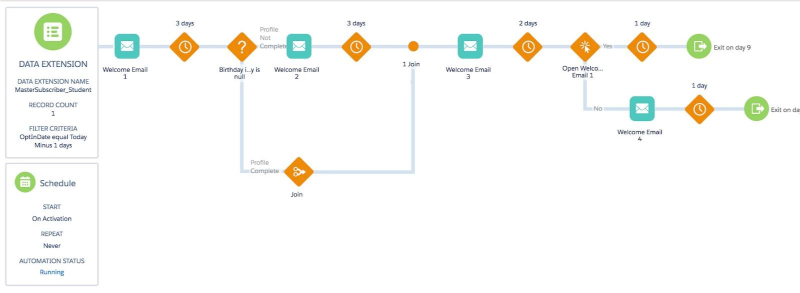
data extension

Some email marketing platforms, like Salesforce Marketing Cloud (as seen above), offer the ability to spread out emails over journeys.

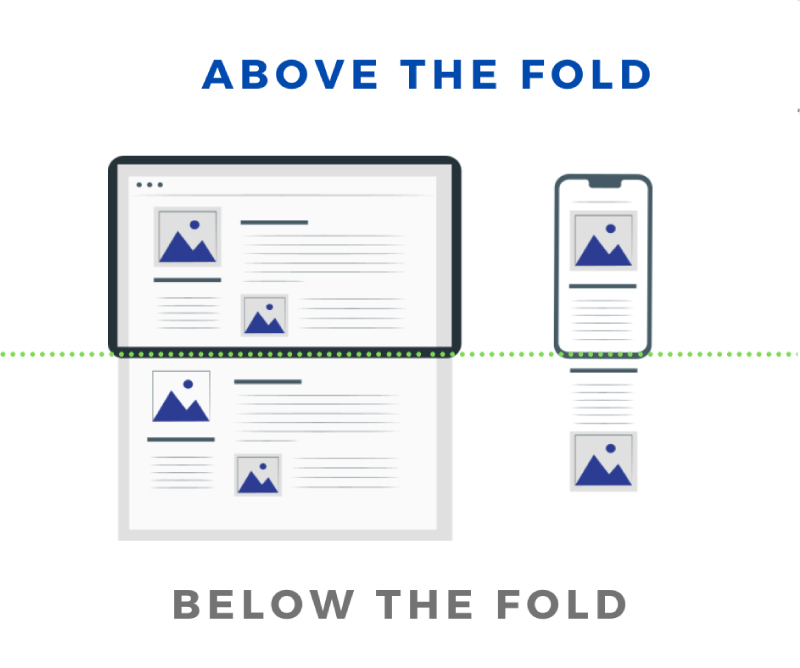
Another way to get that message across immediately is by focusing on what is communicated “above the fold.” This refers to the part of the email that the subscriber sees immediately upon opening, without scrolling.

Ask yourself: Does the content in this area truly make my readers want to continue reading (below the fold)? Does the content in this area make my subscribers want to click on a link or act on what they see there?

3. Devices and Delivery: Mobile First

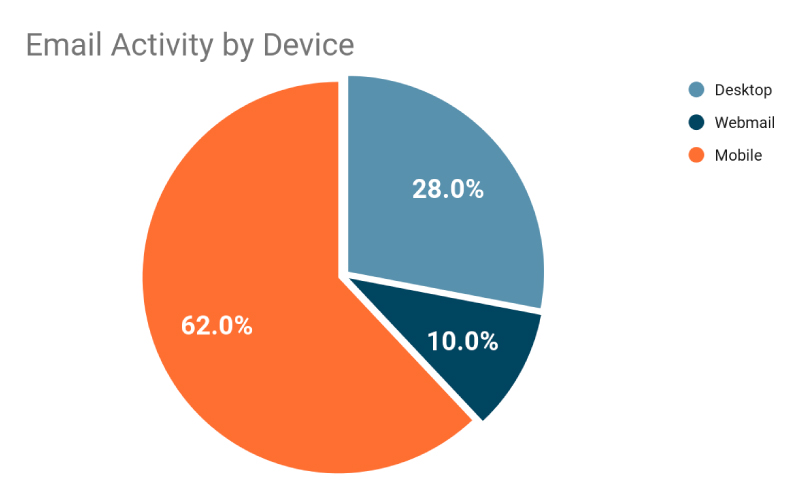
We often imagine our subscribers reading our messages calmly at a desktop computer as they sip their coffee during a break, but that’s far from reality. As of March 2019, over 60% of email activity was on a mobile device.

email activity by device

Source: uplandAdestra

That means that when creating emails, we should all be thinking and designing mobile first, then looking at desktop, and not the other way around. Many mobile users also use dark mode. So make sure to take that into consideration and test accordingly.

Another thought is regarding when you send. If over half of your subscribers can receive email on their mobile devices, that means that healthcare providers (HCPs) have that same device with them outside of the office, when they’re not working. So, have you tried email campaigns on the weekends? It could be that your particular audience is more likely to engage outside of work.

4. Deliverability: Is Anyone Reading This?

How would you feel if you put all of this hard work into creating the perfect email, but then it was sent to the spam folder, or worse, blocked by the email client? I think it goes without saying that that is the last thing we want to happen. So paying attention to key factors that can affect the deliverability of our message is another key to email marketing in Health and Pharma.

How big is your email? Some email clients may simply bounce your email if it’s too large for their particular system. So it’s good to keep in mind the overall email size when designing your email. Images and GIFs can increase that size, so use them wisely. Some good best practices are as follows:

  • Keep the email body under 100 KB.
  • Don’t add attachments over 10 MB.
  • If possible, provide links to files rather than attaching them.

Mailbox providers analyze different factors to judge our mail. This results in what many call a “sending reputation.” How’s your reputation, you might wonder. There are several tools available that can help you get an idea of how you’re doing. Some of such tools are EmailOnAcid and MXToolBox.

It’s also important to examine who is showing as the sender of your email. Is it an individual person within your organization or is it a general address from your company? This can also have a direct impact on your deliverability.

5. Integrate Your Campaign into a Complete Client Experience

Have you applied all of the above points, and are looking to take your Health or Pharma email marketing campaigns to the next level? Another key is being able to integrate your email campaigns within an overall experience that spans multiple channels.

For example, you might send a follow-up email to an HCP after they have been visited by someone from the Sales team. Or you might create a campaign that encourages subscribers to sign up for a webinar. When you have a complete view of the communication cycle, then you’re able to use each channel appropriately. You can then integrate email marketing at the appropriate point and utilize it as a launching point for other channels.

integrate your campaing

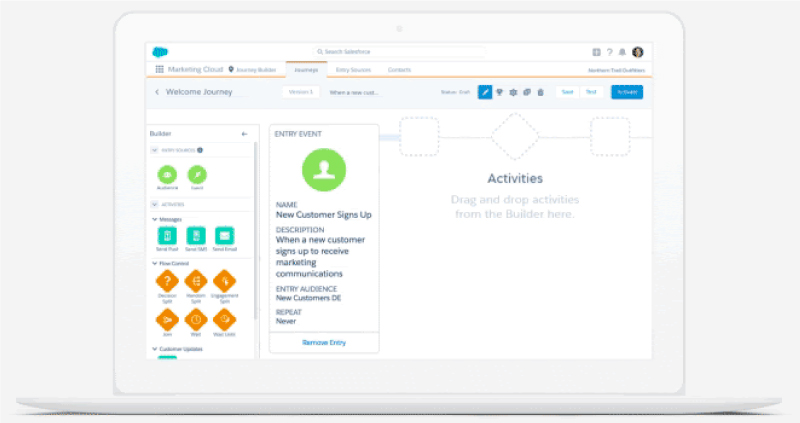
Salesforce Marketing Cloud allows you to customize a journey to provide the experience your customers need across multiple channels.

For this very reason, email marketing platforms are evolving more and more towards marketing automation. Salesforce Marketing Cloud is an excellent example of one such platform.

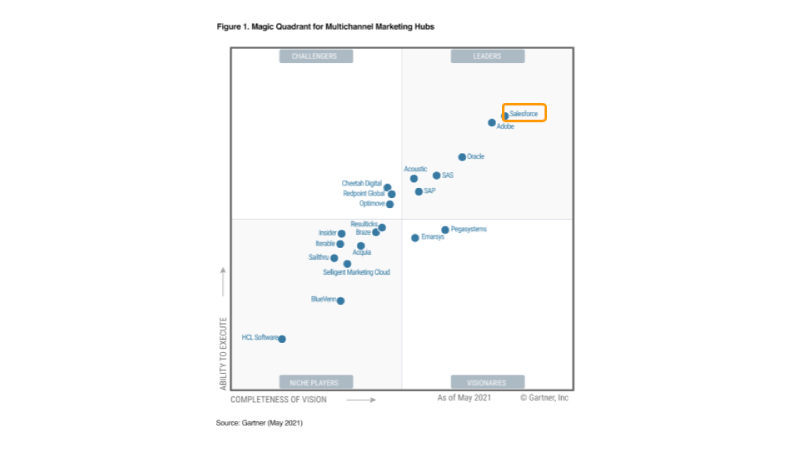
It is a leader in the Multi-channel Marketing field and offers the capability to perform mass-send email campaigns or to engage in more advanced marketing automation to create tailor-made multi-channel journeys.

In this article we’ve considered these 5 keys to Email Marketing in Health and Pharma:

  1. Segmentation
  2. Eye-catching and clear content
  3. Mobile-first design
  4. Deliverability
  5. Integration into User Experience

At ShowerThinking we are dedicated and certified pros when it comes to Marketing Technology. Feel free to continue browsing here on ShowerThinking.com or to reach out to us directly to see how Salesforce Marketing cloud and other technologies can help you to efficiently achieve your goals in these 5 key areas of email marketing.

Marketing Cloud June 2021 Release

Markerting Cloud Release

As part of the Salesforce improvement policies, the past 12th of June Marketing Cloud launched a new update. These improvements have arrived to have a better platform experience and to make our job as marketers easier.

The first upgrade is regarding Salesforce CDP. For those readers who don’t know what a CDP is, it’s the abbreviation for Customer Data Platform, which means a tool for unifying all customer information in one data model and simplifying the access from other platforms to make this process easier. This is not an improvement directly to Salesforce Marketing Cloud but it’s a great tool to have a better data ecosystem between Salesforce and Marketing Cloud.

Use Interaction Studio Behavioral Data in Salesforce CDP

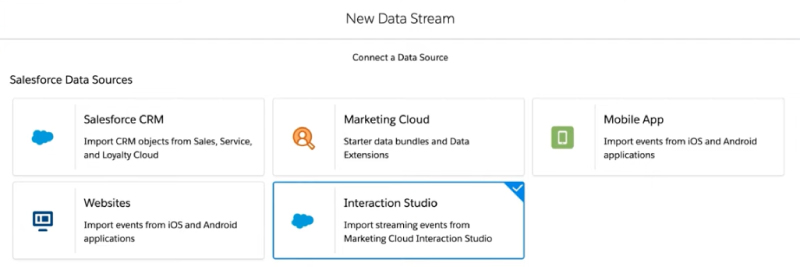
You can now connect to an Interaction Studio account from Salesforce CDP.

If we use the new recent solution called Interaction Studio, we can now use all this data from our dataset to populate Salesforce CDP. This can be possible with the new connector in Salesforce CDP:

We just need to select a new Data Stream in CDP to choose all behavioral data from Interaction Studio and make our data more centralized.

This great tool will facilitate the flow of information between Interaction Studio and Salesforce and we will be able to nurture our campaigns and leverage the power of information in our tools.

Load Data from Salesforce CDP into Datorama

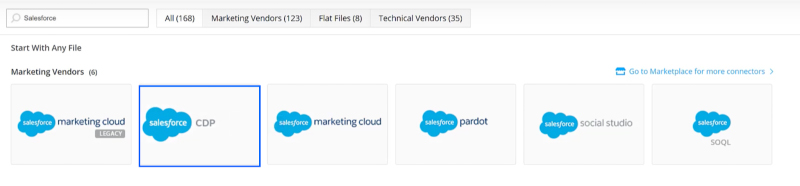
You can now load your data from Salesforce CDP into Datorama with the Salesforce CDP API connector and app.

It’s time for Datorama, now we can connect our CDP to Datorama and use all data to make awesome graphics and statistics. Datorama is a tool to make visible our information and data, so we can now make better and stronger reports. This change applies to all Datorama Editions.

Datorama is the perfect tool to translate our raw data into actionable information, so with this enhancement we will be able to have all that relevant information at a glance through graphs and useful dashboards.

Thanks to this integration, we will be able to harmonize the information stored in the CDP to make it more usable by the Datorama data model.

Load Data From Salesforce CDP into Datorama

Datorama Advanced Reports for Marketing Cloud

Better and improved reports for all your needs.

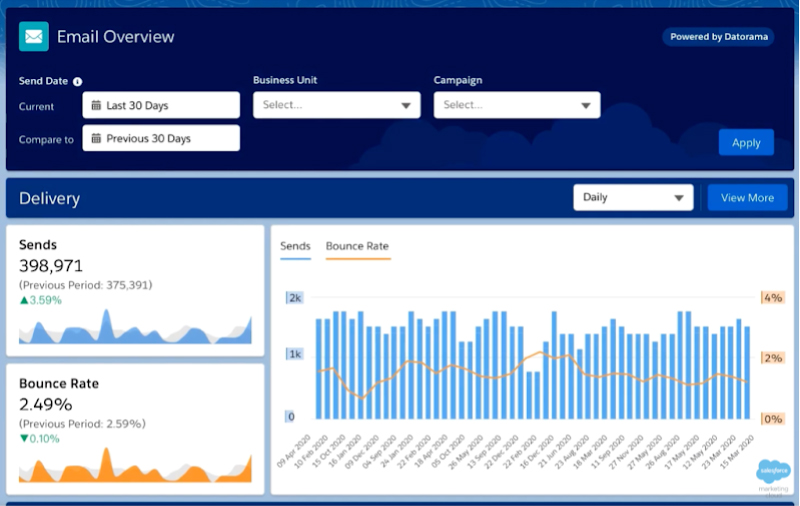
Time to report! Now from Datorama we will be able to consult and generate reports of our campaigns made with Email Studio and Journey Builder.

Thanks to the improvement that Salesforce has developed for this month of June, from Datorama we will be able to create pre-built panels to facilitate the creation of graphs and dashboards. Simply choose the campaign you have run and the results will be there, ready to make decisions and take advantage of the power of information.

In addition to this, Datorama is now able to schedule reports on a recurring way and export them to compatible files such as Excel, CSV, PDF even PowerPoint and PNG for a more visual reporting experience.

Now Datorama has more power and is a little more independent.

This upgrade is available for corporate or enterprise Marketing Cloud editions, or as a Discover add-on SKU for Pro customers.

Datorama Advanced Reports for Marketing Cloud

Einstein for Marketing Enhancements

Our beloved Einstein continues to learn and help us to be more productive with less effort.

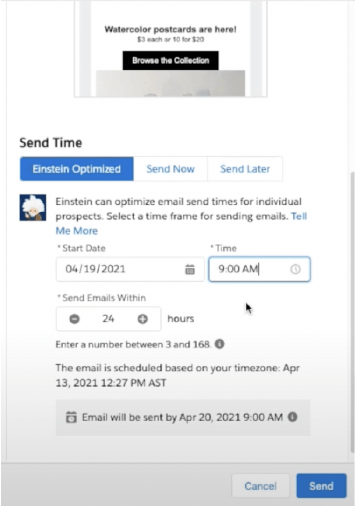
In this release, Einstein has learned how to use Pardot, and now he will be able to help us send an email at the perfect time for each user. Salesforce has implemented in Pardot the already known Einstein Send Time Optimization, and we will take advantage of this new feature offered by Artificial Intelligence.

Einstein for Marketing Enhancements

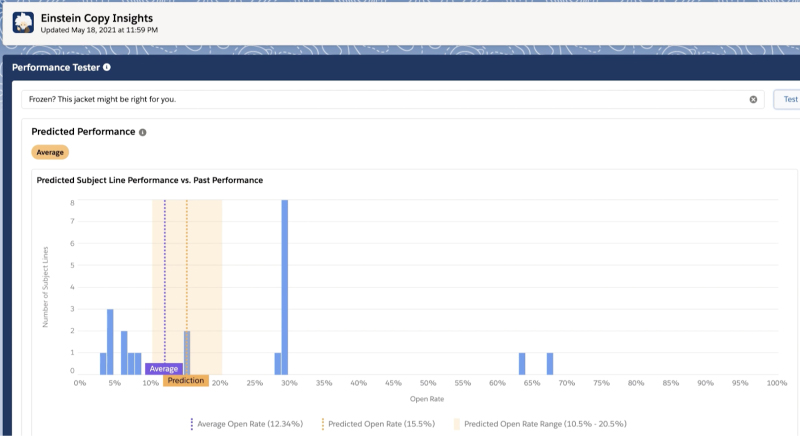
In addition, continuing with the theme of machine learning, we will now be able to predict open rates from the point of view of the subject of an email. Einstein Copy Insights Performance Tester for Subject Lines is now available in Marketing Cloud.

Einstein for Marketing

Advertising Studio Enhancements

Snapchat:

With the latest Advertising Studio enhancements, marketers can now use their first-party data stored in Salesforce to create targeted, personalized advertising audiences for Snapchat. A new social network that can be used to interact with our customers.

Datorama:

Now we can connect Datorama with our Advertising Studio. Thanks to this development, we will be able to harmonize and visualize your results in a more graphic way. As with everything that surrounds Datorama, the advantage of adding more information to this platform is that we will be able to generate visual reports and reports that will help us to make decisions and process raw information.

Accounts as Campaign Members

Power ABM with account targeting.

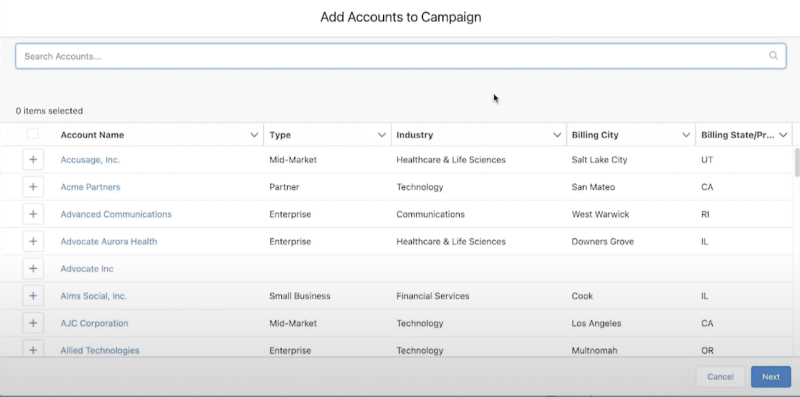
We can now assign a campaign to a Salesforce account. This gives us the freedom to assign a campaign to several contacts via their Account. This makes it easier to plan our scheduling and get results. It may seem like a minor change, but it gives you a multitude of possibilities.

Accounts as Campaign Members

This has been all about the June 2021 Salesforce update.Now it’s up to us to learn how to use these enhancements and get the most out of them that we can.

Best regards!

Marketing Cloud Einstein

Marketing Cloud Einstein

Einstein, the powerful artificial intelligence tool that Salesforce has incorporated into its Marketing Cloud digital marketing platform, is going to help us answer them.

At what time am I most likely to have my contacts open my emails? 

Can I get to know my subscribers and their interactions with my brand even better?

What will be the optimal sending level for each of my subscribers? 

Can I do anything else to reduce the unsubscribe rate or my emails being reported as spam?

These are questions that any marketing manager has asked many times.

Einstein’s set of functionalities provide us with valuable knowledge of our customers both as a whole, as well as on an individual level, knowledge that we will also be able to apply effectively and quickly to create much more personalized customer experiences across all communication channels.

As we will see, some of the features of Einstein and its interactions with Journey Builder, the great “jewel in the crown” (option B – an already very complete and powerful tool) within Marketing Cloud, end up “fine-tuning” even more if possible the already excellent tool that is Journey Builder.

Let’s briefly explain the main features of Einstein available in Journey Builder:

Send Time Optimization

At what time am I most likely to have my contacts open my email?

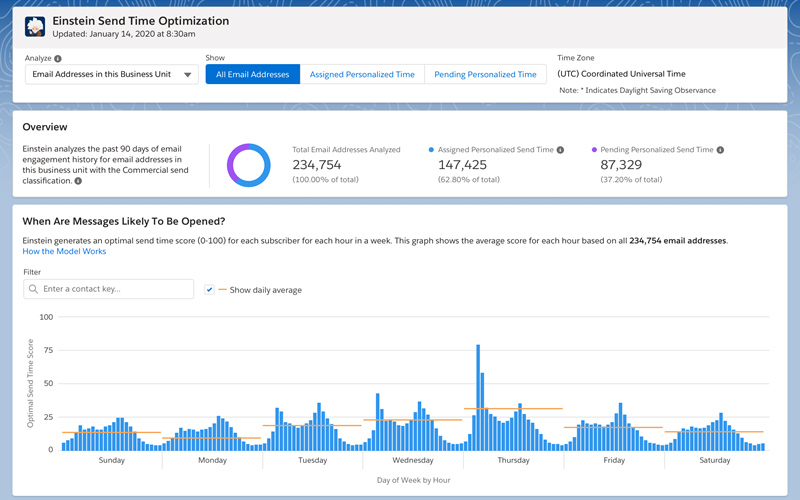
Simple and effective. This feature of Einstein becomes a valuable help to answer the question that all of us responsible for digital communications ask ourselves every time we launch a mailing, Einstein STO allows us to add an activity in Journey Builder prior to the email activity that will decide for each contact, within the time interval that we indicate, the best time to send the email.

Einstein Send Time Optimization model:

  • Input: The model makes calculations using up to 90 days of your contacts’ engagement and behavioral data, including when messages are sent and opened.
  • Output: Each hour is assigned a score for each contact. Contacts are more likely to open a message if it’s sent during an hour with a high score.
  • Model: The model analyzes each contact’s best send hours and engagement data. Send hours that have higher open rates are likely to have higher scores. When send-hour history doesn’t provide enough information, recommendations rely on engagement data to generate analysis.

Einstein Engagement Scoring

Can I get to know my subscribers and their interaction with my brand even better?

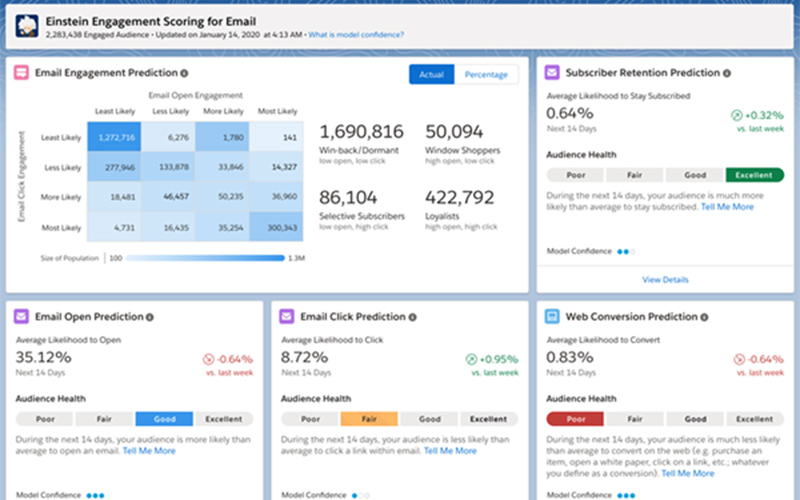
Einstein Engagement Scoring is a predictive segmentation tool for SFMC that predicts subscriber engagement with your email campaigns over the next 14 days.

Another great feature that comes to reinforce Journey Builder allowing us to add a Scoring Split based on the engagement of our subscriber with the email or with our apps.

Einstein categorizes our subscribers into the following groups:

  • Loyalists: High open and high click engagement
  • Window Shoppers: High open and low click engagement
  • Selective Subscribers: Low open and high click engagement
  • Winback/Dormant: Low open and low click engagement

In this way we can create different branches in the journeys using the drag & drop system and therefore further customize the customer experience.

In addition, in the email channel, we can also choose to create different communication flows based on the propensity for certain actions: likelihood to open the email, to click, to convert on the web or even to remain subscribed.

Einstein-engagement-scoring

Einstein Engagement Frequency

What will be the optimal level of sends for each of my subscribers? Can I do anything else to reduce the unsubscribe rate or to keep my emails from being reported as spam?

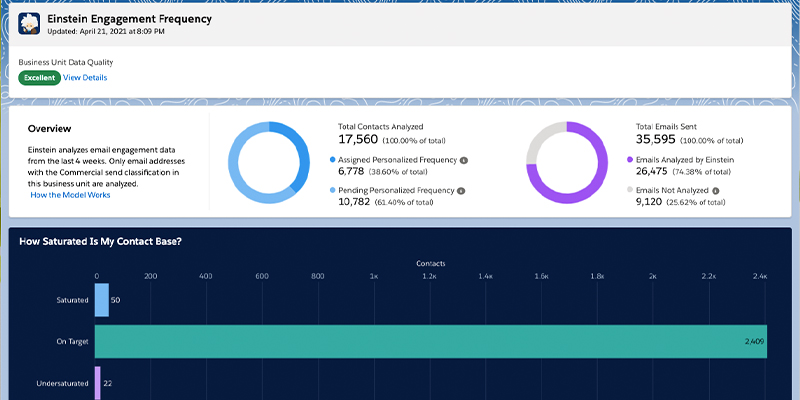
To help us find that difficult balance point, Einstein Engagement Frequency provides an optimal range of how many emails to send over a given time period, comparing send frequency and engagement trends and getting suggestions of the optimal send rate.

This functionality will allow us to identify those subscribers who are already oversaturated and also the opposite case, those subscribers we are “under-engaging”.

The Split Frequency available in Journey Builder, which like the previous ones works through the drag & drop option, allows us to establish different routes for customers based on four categories:

  • Saturated
  • Almost Saturated
  • On Target
  • Undersaturated

Einstein Engagement Frequency model:

  • Input: The model makes calculations using the last 28 days email engagement and behavioral data, including when messages are sent and opened, and unsubscribes.
  • Output: Each contact’s engagement data is analyzed in comparison to the frequency of messages sent to them to generate a personalized engagement frequency score. Based on this score, contacts are classified as having Saturated, On Target, or Undersaturated message frequency. This data is used to inform how often you send messages.
  • Mode: The model analyzes how often each contact is sent to and how send frequency affects engagement. Engagement generally increases when send frequency increases until a contact reaches saturation. Contacts without enough send frequency data to generate a personalized engagement frequency score are treated as part of the On Target segment.

As I mentioned at the beginning, all these functions will help us to improve our subscriber’s individual experience through their direct application in Journey Builder, but they also enhance our global knowledge of our customers, since each of them has its own Dashboard.

einstein-engagement-frequency

Email Studio in Marketing Cloud: What it is and what it offers

Feature image email studio marketing cloud

As is the case with Email Studio, there is currently an infinite number of tools focused on Email Marketing, but year after year we are witnessing an evolution of these types of tools towards Digital Marketing Hubs that allow us to manage not only Email Marketing but also other types of actions such as the management of Social Networks.

Within this type of platform, there is the Salesforce Marketing Cloud, one of the Digital Marketing Hubs par excellence with a powerful Email Marketing module called Email Studio. If you still don’t know what Marketing Cloud is and would like to find out more about this platform, we invite you to read the following article to find out what Marketing Cloud is? The Salesforce Digital Marketing Hub.

Email Studio What is it?

que es email studio pequeno

It could be said that Email Studio is one of the most complete email marketing tools on the market and one of the most important modules within Marketing Cloud, as it is the module in which all types of activity with our subscribers is managed through the email channel.

In Email Studio, we can create all kinds of Emails (from scratch or through pre-defined or self-created templates), manage the uploading of contacts and subscribers, perform A/B tests on our sends, configure advanced sending options, perform reports and view metrics of our sends, etc.

Possibilities with Email Studio

Email Studio allows for an infinite number of possibilities, among which the following should be highlighted:

  • Content creation: within Email Studio we have the ability to create emails through blocks of content or pre-defined Marketing Cloud templates. The customization that can be made in emails is very extensive and can also include dynamic content that responds to parameters included in lists of subscribers or data extensions.
  • Subscriber management: the use of subscriber lists or data extensions is essential when sending emails in the Marketing Cloud. Therefore, within Email Studio there is an extensive menu in which you can see data on data extensions, subscriber lists, shared elements, profile and preference management, data filters, etc. If you already know more about this type of process, we recommend you take a look at the following article to find out when to use a Data Extension or a subscriber list in the Marketing Cloud.
  • Campaign automation: through Automation Studio you can create workflows that allow you to create automated email marketing campaigns, in addition to many other features that this module has.
  • Monitoring and optimization: Email Studio offers a range of interesting metrics and reports to track the performance of our emails. These types of reports offer metrics such as deliverability rate (delivery rate), number of bounces (with their reasons and classification), number of openings and clicks (both total and unique), CTRs, open rates, etc. It also offers an interesting visual module in which you can see the performance of users in the different clickable modules in percentages. All this data can be downloaded in PDF format to identify individually the performance of each subscriber.

In addition to all this, Email Studio is connected to the different modules/apps of the Marketing Cloud, so it can be used to make journeys through the sending of emails (in Journey Builder), it can be connected to the different lists of subscribers or data extensions (created in Contact Builder) or it can be used to make different reports and automated programs as already seen (in Automation Studio).

Take a look at the following video to see an overview of the possibilities offered by Email Studio:

Types of emails we can send with Email Studio

Through Email Studio’s Email Builder, we can create any kind of email, as there are infinite possibilities and everything can be done from scratch. But speaking of typologies when it comes to sending emails, there are three clearly defined types:

  • Transactional emails: this category includes all the emails that have to do with the transactional or purchase process of a product/service, such as purchase confirmations, emails relating to shipping notifications, product/service tracking emails, etc.
  • Promotional emails: here however we refer to any type of email related to promotions, such as newsletters, sending of promotions, events, discounts and coupons, loyalty programs, etc.
  • E-commerce emails: within this category, we can see examples of what large companies such as Amazon or Ebay do, as they send emails about recommended offers, abandoned shopping carts, order confirmations, post-purchase product assessment, etc.

Benefits of Email Studio for your company

Advantages email studio

In general, if your company uses the Marketing Cloud, it has already gained a series of advantages over companies that use other types of Marketing Automation platforms, as the Marketing Cloud is one of the most complete platforms on the market. But specifically, Email Studio, although it is a part of this great platform, offers many advantages to be highlighted once it starts to be used. Some of these advantages are:

  • Ease of use: Email Studio does not require in-depth knowledge of code when creating content, as its Drag-and-Drop interface allows the creation of emails of all types through simple or dynamic blocks (although it is always advisable to have a minimum knowledge of HTML code in case problems arise when creating content).
  • Connection with other modules and reduction of process complexity: Marketing Cloud combines different modules that complement each other, so that when working in Email Studio we can use different modules to complement our Email Marketing strategy, performing for example journeys based on user activity, automation, segmented, dynamic sending, etc.
  • Predictive Intelligence: Marketing Cloud includes the Einstein AI functionality through which companies can use their customer information to provide content based on the previous behavior of the same. This is also the case with Email Studio when offering dynamic content, A/B testing, or, for example, carrying out a journey by segmenting the sending of several emails depending on the number of user clicks.
  • Email sending security: Apart from being able to make the necessary configurations in terms of profiles and preferences for sending emails, we can segment our sendings and carry out as many test or trial sendings as we need, as well as add and delete users when sending emails based on data extensions or subscriber lists (both inclusion and exclusion).
  • Optimization of content and improvement of ROI: Through Email Studio, any sending or action we take is measurable, both generally and individually, so the greater knowledge and possibility of connection with big data tools such as Tableau or Einstein Analytics, we have greater possibility of optimizing our content and actions and impact directly on the ROI of our company.

In short, Email Studio is a module to be taken into account within the Marketing Cloud, as it is one of the most important, allowing you to carry out an infinite number of actions and allowing you to be aware of other modules thanks to its close relationship in other processes with them.

Although Email Studio requires a great deal of knowledge and implementation in order to fully exploit its functionalities and take advantage of all the benefits it offers, at ShowerThinking we specialize in developing automation and marketing management programs with your company through the Marketing Cloud. Therefore, if you need help or training in Marketing Cloud  we have the right team that can help you, so don’t hesitate to contact us!

Test A/B in Email Studio: Steps and considerations

Test AB Marketing Cloud

As we know, the Salesforce Marketing Cloud is made up of several modules that cover different areas of Digital Marketing for B2B and B2C. Sending emails that generate a positive impact on our clients’ subscribers represents a fundamental area in Email Marketing strategies. Therefore, Marketing Cloud covers this aspect with tools such as Email Studio […]

Continue reading