Although preparing for the trip to San Francisco to attend Dreamforce (Salesforce’s annual event) is becoming a habit for the team, this year is particularly interesting for me. As I have commented on several occasions, Dreamforce is probably one of the biggest marketing events in the world. This year the number of attendees will probably […]
We are a partner of Datorama! In ShowerThinking, Intelligent Marketing agency, we have just certified the business level in Datorama, the integration tool that allows to connect all data sources and generate an integrated source that facilitates the analysis and decision making. We add this new Partnership, which our team of specialists has […]
Being up to date in the world of CRM today means being on the cutting edge of Salesforce, a CRM application platform that allows us to connect with our customers in a different way. Within Salesforce we find different applications depending on the department that will be using it. This time I’m going to talk […]
In relation to the topic I already mentioned in this post about Salesforce Certifications, I’m going to try to solve your doubts about how to take the exam for Cloud Email Marketing Specialist. First things first: there are four exams to obtain the complete Cloud Marketing Certification: Cloud Marketing Manager: Designed for administrators who […]
Salesforce certifications, and how to get them, are one of the most frequently asked questions by my students. I’m currently studying my eleventh certification on the platform, and after getting certified as an architect, I think it’s a good time to offer my point of view and help if you’re trying to get certified in […]
The Salesforce Marketing Cloud is one of the most comprehensive marketing platforms on the market. It has different modules that cover most of the needs of a modern marketing department, such as Social Studio for managing social networks, Advertising Studio for managing advertising campaigns, Mobile Studio for mobile communication or Email Studio for communication via email. If you still don’t know what Marketing Cloud is or you need more information about the platform, I invite you to read the following article that deals in depth with What is Marketing Cloud? Salesforce’s Digital Marketing Hub.
The Contact Builder section is responsible for maintaining subscriber relationship data. If you want to see a more detailed explanation of Cloud Marketing, I recommend watching my video on youtube about the different parts that make up the platform.
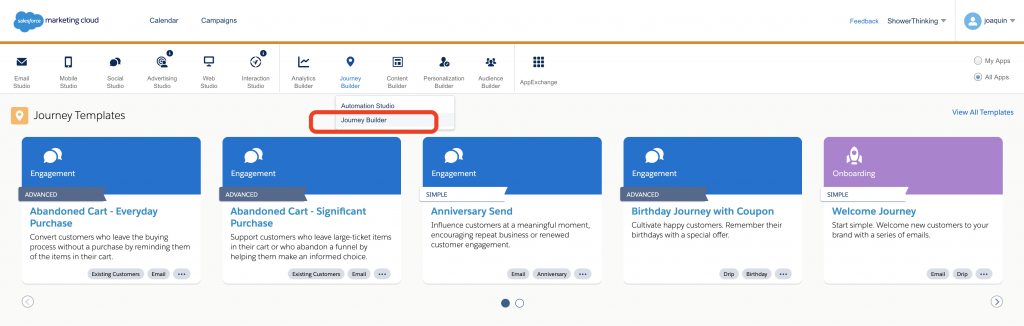
Journey Builder is the core of the platform and is where the Journeys we want to establish with subscribers/customers are configured.
What is Journey Builder?
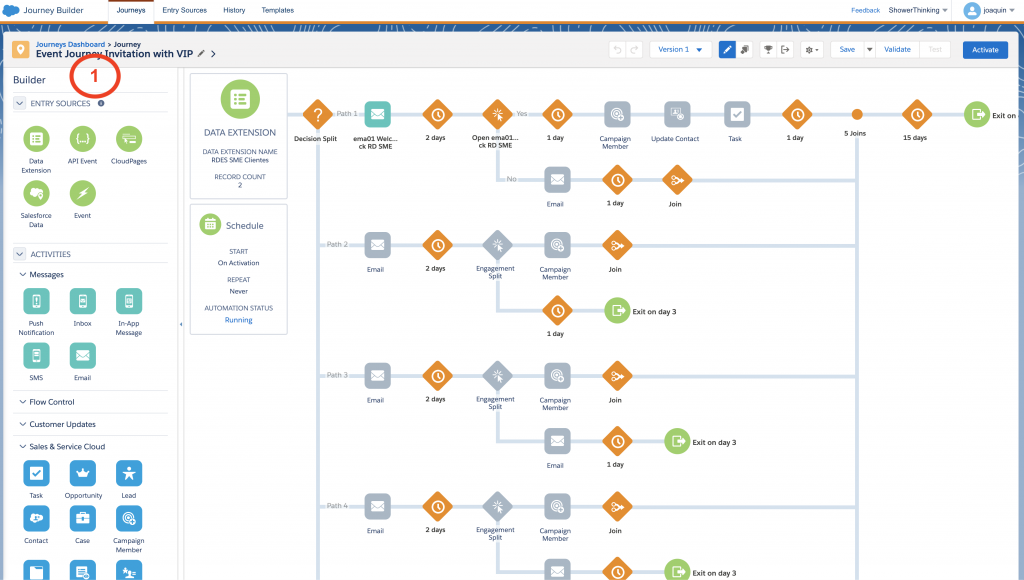
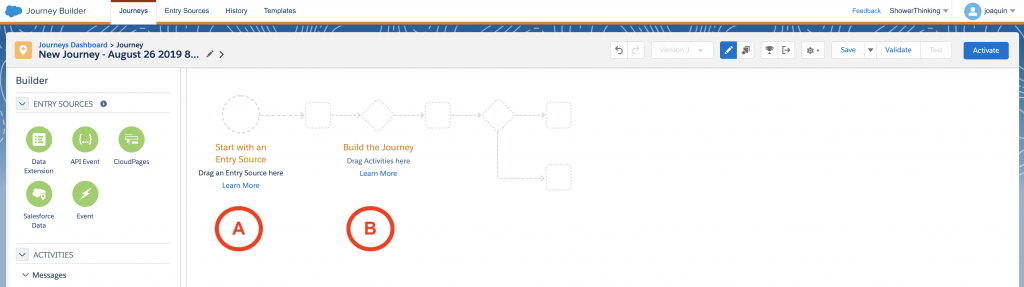
Journey Builder is the part of the Marketing Cloud that serves to create paths of interaction with customers or Customer Journeys. The way to generate these journeys is through visual programming, for which we will use the Canvas of the application.
The canvas is divided into a first vertical column on the left, which are the elements that you can drag and drop into your Journey (marked in the image with the number 1). You will see that there are 5 different categories of elements that you can include in a Journey: Entry Sources, Activities, Messages, Flow Control, Customer Updates and Sales & Service Cloud.
One of the most interesting elements that we can introduce in a Journey are the activities related to the Sales Cloud since we can Create/Update Contacts, Opportunities, Leads, Add members to a campaign or Create/Update any type of object in the Sales and Service Cloud.
The programming of each Journey is divided into 2 distinct parts: Entry Source are the elements that trigger the Journey (marked with A in the image) and cause us to introduce a user into the flow. On the other hand there are the elements of the Journey (marked as B) that program the interactions that we are going to do with the users.
In the Journeys that we will see next, you will see how you must establish a series of user input sources in a journey together with a more or less complex programming of the steps that we are going to establish with them.
The 5 Essential Journeys
There is multiple technical information in Salesforce itself that describes this part of the tool, but from a marketer’s point of view it is necessary to understand how to develop customized customer communication programs. One of the easiest ways to learn it is to know how other customers use it.
That is why we are going to review 5 cases in which I have worked in different companies within their Marketing Cloud implementation projects. It has been complicated to choose which Journeys would be chosen for this publication, given that dozens of different Journeys have been implemented over time.
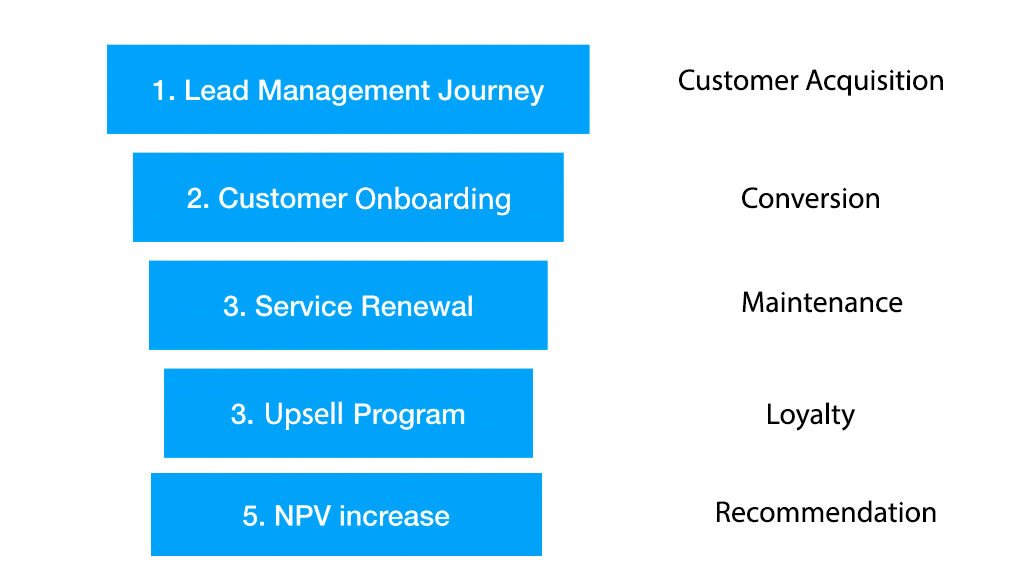
Thinking about which would be the clearest and most didactic way, I present them to you starting with the simplest ones. They are ordered according to the different states of a supposed conversion funnel. Therefore, I present the 5 Journeys suitable for each stage, hoping that they can serve as inspiration for your project.
1. Lead Management Journey (customer acquisition)
Establishing an orderly and precise customer acquisition process is a priority for every marketing team. The example we will see below is a simplification implemented for a technology company that offers complex IT/IT security products for its clients in Spain and Latin America.
Several types of lead capture campaigns land on the client’s website (Organic, Paid Media and Events especially) since part of the client’s products are based on an Open Source solution. There is a large niche community interested in security solutions.
The recruitment strategy is based on the early identification and qualification of companies interested in the client’s product. This is done through a product demo or a Free Trial. This modality of Journey can be extrapolated to different companies that commercialize products (like this case) or services.
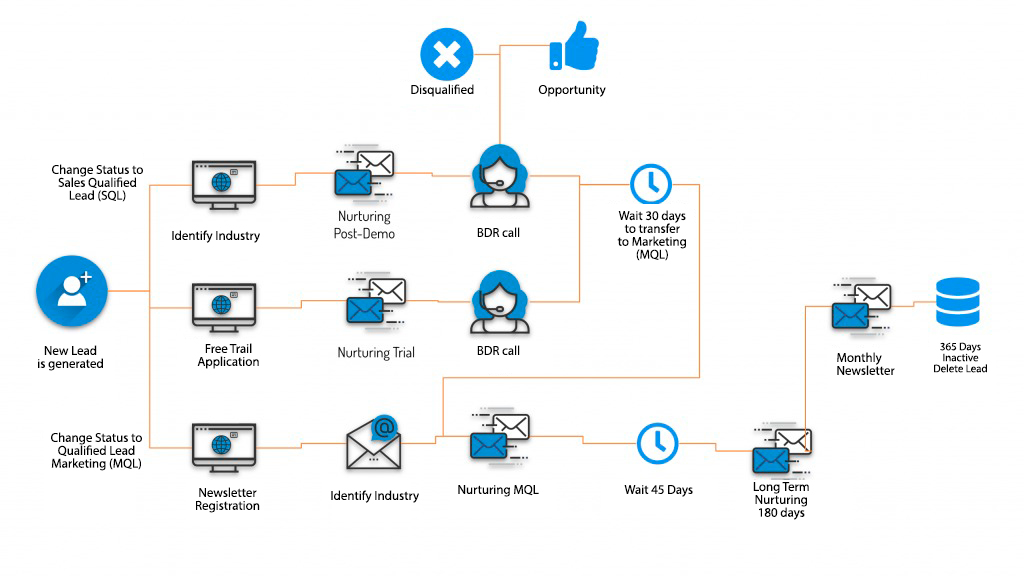
The first point to comment is that the capture of leads is done through campaigns that direct customers to different forms on your website. Some of them allow the customer to sign up for the monthly newsletter, but the most important ones allow the customer to request a product demo (video conference) or a Free Trial.
The process coordinates the interactions between a sales team (called business development representatives or BDRs) and the Marketing Automation platform. Once the potential client requests a demo/trial or registration in a newsletter, he or she will enter a Journey where the sales team will perform a demo (and at the same time be able to qualify the sales opportunity) or obtain feedback on the trial that the client has performed and at the same time see how the product can fit into the organization.
The call to the client by the sales team after the trial period is a critical moment where the opportunity is qualified or disqualified with the client. A waiting time of 30 days is generated and the closing date of the opportunity is updated in case of not having a clear answer. Once this time has passed, the lead is transferred back to Marketing in case a sales agreement cannot be closed.
The leads enter into a Nurturing process extended by 6 months with a special follow-up, and in case this period of inactivity is exceeded it is transferred to the monthly newsletter list of the company. In case of inactivity for 365 days, the lead is discarded.
How this journey is implemented in Marketing Cloud
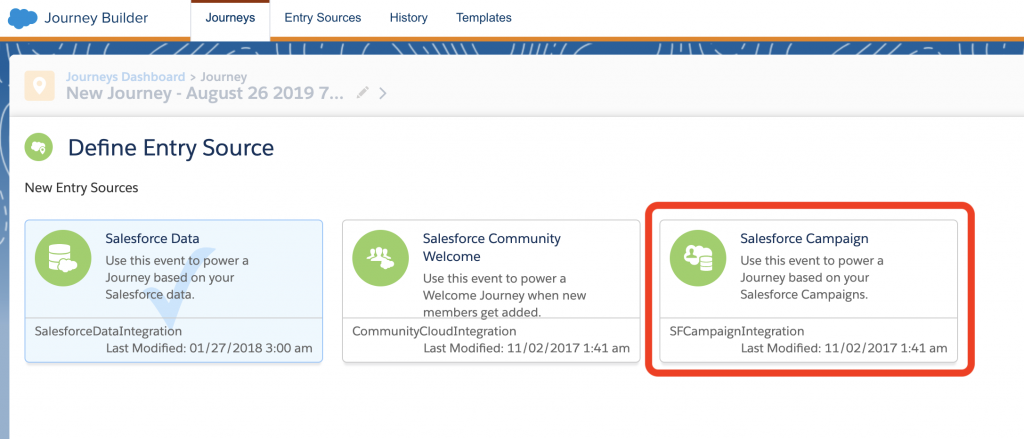
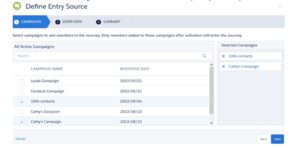
The first interesting point to highlight is how the leads generated in this Journey are introduced. In previous steps of the project, the client’s website and its integration with the Sales Cloud had been developed. So, using existing web to lead forms on the client’s website, new leads are generated and assigned to salesforce campaigns.
To reuse this functionality, the marketing cloud entry source is based on the entry of leads in the appropriate campaign.
Therefore the leads enter the appropriate Journey in coordination with their entry into a specific salesforce campaign.
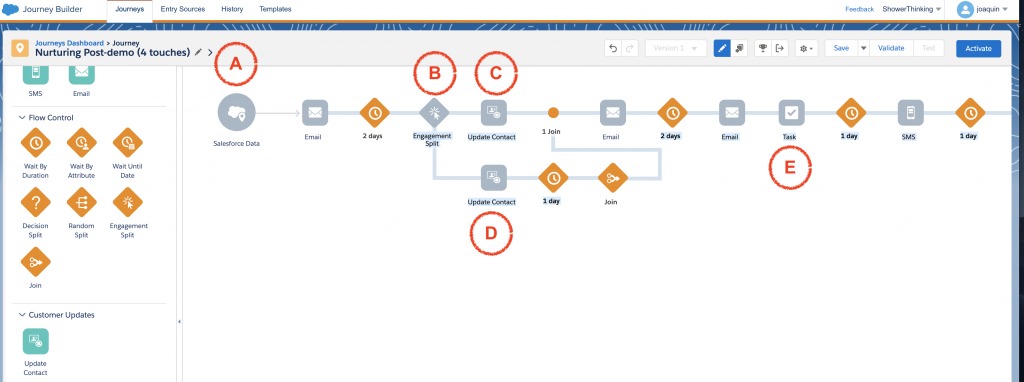
Let’s see below how follow-up calls can be implemented after a demo by the sales team (Nurturing Post-demo). Below is a simplified Journey in the Marketing Cloud about its implementation.
As always we are launching this Journey based on the contact’s entry into a campaign. These campaigns are coordinated with the team of sales representatives.
In point B we make a Split engagement (decision on whether the client opens the email or not) to update the client’s activity (if he opens it we increase his activity in point C or decrease it in point D).
Finally, in point E we generate a task for the assigned representative the day before the call attempt by the sales team. We finish by sending an SMS the morning of the call to confirm the appointment.
I hope this example has helped you to establish the best way to implement your Journey with clients in your projects. In the next articles we will review different techniques to implement them.
Knowing the best way to implement a marketing campaign on Marketing Cloud requires experience in multiple projects and technical support. The first steps in the platform always generate doubts. In ShowerThinking we are specialists in developing with your company programs to automate marketing campaigns. If you need help or training in Marketing Cloud we have the right team that can help you.
Last week we learned of the acquisition of Tableau, a leading company in the Business Intelligence (BI) market, by Salesforce. Apart from the astronomical figures being considered in the operation, it is interesting to understand the consequences of this acquisition in the world of Marketing and how the panorama changes. Those of us who work […]
We use cookies on our website to give you the most relevant experience by remembering your preferences and repeat visits. By clicking “Accept”, you consent to the use of ALL the cookies. However you may visit Cookie Settings to provide a controlled consent.
This website uses cookies to improve your experience while you navigate through the website. Out of these cookies, the cookies that are categorized as necessary are stored on your browser as they are essential for the working of basic functionalities of the website. We also use third-party cookies that help us analyze and understand how you use this website. These cookies will be stored in your browser only with your consent. You also have the option to opt-out of these cookies. But opting out of some of these cookies may have an effect on your browsing experience.
Necessary cookies are absolutely essential for the website to function properly. This category only includes cookies that ensures basic functionalities and security features of the website. These cookies do not store any personal information.
Cookie
Duration
Description
cookielawinfo-checkbox-advertisement
1 year
This cookie is set by GDPR Cookie Consent plugin. The purpose of this cookie is to check whether or not the user has given their consent to the usage of cookies under the category 'Advertisement'.
cookielawinfo-checkbox-analytics
1 year
This cookie is set by GDPR Cookie Consent plugin. The purpose of this cookie is to check whether or not the user has given the consent to the usage of cookies under the category 'Analytics'.
cookielawinfo-checkbox-necessary
11 months
This cookie is set by GDPR Cookie Consent plugin. The cookies is used to store the user consent for the cookies in the category "Necessary".
cookielawinfo-checkbox-non-necessary
11 months
This cookie is set by GDPR Cookie Consent plugin. The cookies is used to store the user consent for the cookies in the category "Non Necessary".
cookielawinfo-checkbox-performance
1 year
This cookie is set by GDPR Cookie Consent plugin. The purpose of this cookie is to check whether or not the user has given the consent to the usage of cookies under the category 'Performance'.
cookielawinfo-checkbox-preferences
1 year
This cookie is set by GDPR Cookie Consent plugin. The purpose of this cookie is to check whether or not the user has given the consent to the usage of cookies under the category 'Preferences'.
viewed_cookie_policy
11 months
The cookie is set by the GDPR Cookie Consent plugin and is used to store whether or not user has consented to the use of cookies. It does not store any personal data.
Any cookies that may not be particularly necessary for the website to function and is used specifically to collect user personal data via analytics, ads, other embedded contents are termed as non-necessary cookies. It is mandatory to procure user consent prior to running these cookies on your website.
Cookie
Duration
Description
__cfruid
Persistent
The ‘__cfduid’ cookie is set by the CloudFlare service to identify trusted web traffic. It does not correspond to any user id in the web application, nor does it save any personally identifiable data
test_cookie
11 months
This cookie sets DoubleClick (which is owned by Google) to determine if the website visitor's browser supports cookies.
Analytical cookies are used to understand how visitors interact with the website. These cookies help provide information on metrics the number of visitors, bounce rate, traffic source, etc.
Cookie
Duration
Description
_ga
2 years
This cookie is installed by Google Analytics. The cookie is used to calculate visitor, session, camapign data and keep track of site usage for the site's analytics report. The cookies store information anonymously and assigns a randoly generated number to identify unique visitors.
_gid
1 day
This cookie is installed by Google Analytics. The cookie is used to store information of how visitors use a website and helps in creating an analytics report of how the wbsite is doing. The data collected including the number visitors, the source where they have come from, and the pages viisted in an anonymous form.
GPS
30 minutes
This cookie is set by Youtube and registers a unique ID for tracking users based on their geographical location
pardot
The cookie is set when the visitor is logged in as a Pardot user.
Advertisement cookies are used to provide visitors with relevant ads and marketing campaigns. These cookies track visitors across websites and collect information to provide customized ads.
Cookie
Duration
Description
IDE
2 years
Used by Google DoubleClick and stores information about how the user uses the website and any other advertisement before visiting the website. This is used to present users with ads that are relevant to them according to the user profile.
VISITOR_INFO1_LIVE
5 months
This cookie is set by Youtube. Used to track the information of the embedded YouTube videos on a website.
Performance cookies are used to understand and analyze the key performance indexes of the website which helps in delivering a better user experience for the visitors.
Cookie
Duration
Description
YSC
Session
This cookies is set by Youtube and is used to track the views of embedded videos.
YTC
10 minutes
This cookie is set by Youtube to manage the embed and viewing of videos on our website
Preference cookies are used to store user preferences to provide content that is customized and convenient for the users, like the language of the website or the location of the visitor.
Cookie
Duration
Description
_gat_UA-2503304-40
1 minute
This is a pattern type cookie set by Google Analytics, where the pattern element on the name contains the unique identity number of the account or website it relates to. It appears to be a variation of the _gat cookie which is used to limit the amount of data recorded by Google on high traffic volume websites.